Azure Serial Console Prerequisites for Custom Storage
Short answer
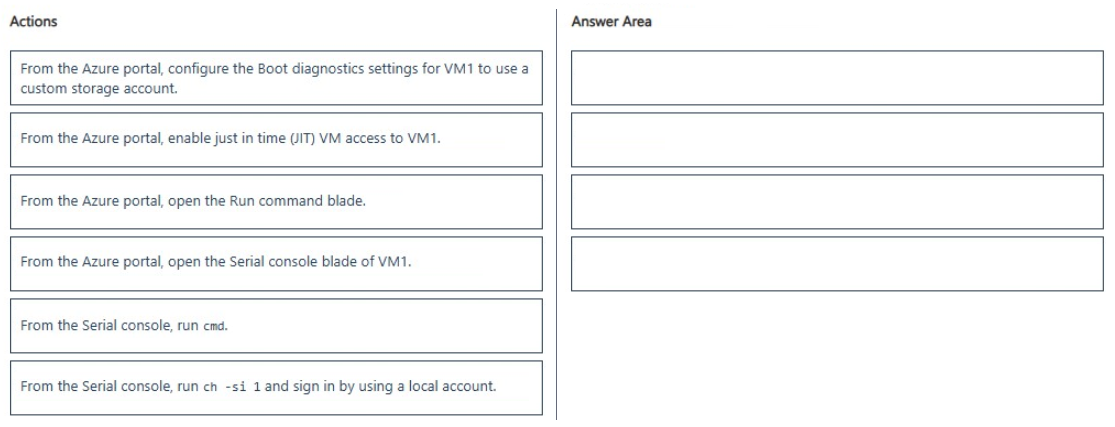
Reconfigure Boot Diagnostics to use a custom storage account, select the VM in the Azure portal, open the Serial console blade, launch cmd.exe, and authenticate to channel 1.
Question
You have an Azure virtual machine named VM1 that runs Windows Server. VM1 has boot diagnostics configured to use a managed storage account.
You are troubleshooting connectivity issue on VM1.
You need to run a PowerShell cmdlet on VM1 by using the Azure Serial Console.
Which four actions should you perform in sequence? To answer, move the appropriate actions from the list of actions to the answer area and arrange them in the correct order.
Key Takeaways
The primary trap is assuming managed storage accounts work with Serial Console; they do not. You must switch to a custom storage account first because the Serial Console needs direct access to storage keys, which are hidden in managed accounts.
Learn why Azure Serial Console requires a custom storage account instead of a managed one for interactive sessions on Windows Server VMs. Understand the correct sequence of actions to enable troubleshooting via the Serial Console.
Common mistake: Learners often skip the storage account change and try to connect directly via the Serial Console, failing because the managed storage account lacks the necessary exposed keys. Another mistake is attempting to run PowerShell directly without first launching cmd.exe or authenticating to channel 1.
Expert Analysis
The Azure Serial Console provides a virtual serial port connection to a VM, allowing administrators to troubleshoot issues even when the network is down or the OS is unresponsive. However, this feature has specific prerequisites regarding boot diagnostics storage. When Boot Diagnostics is configured with a managed storage account, the Serial Console cannot establish an interactive session because it requires direct access to the storage account keys and blob endpoints to stream the connection data. Managed storage accounts abstract these details from the user, making them incompatible with the Serial Console's architecture.
To resolve this, the first mandatory step is to reconfigure Boot Diagnostics for VM1 to use a custom (user-created) storage account. This ensures that you have full control over the storage account credentials, which the Serial Console service needs to authenticate and stream the session. Once the custom storage account is set up, you can proceed to the next steps: navigating to the VM in the Azure portal, selecting the 'Serial console' blade, opening the console, launching a command prompt (cmd.exe), and finally authenticating to channel 1 to execute PowerShell commands. The key distinction here is between managed and custom storage accounts; only custom accounts support the interactive Serial Console feature.
Official Reference
https://learn.microsoft.com/en-us/azure/virtual-machines/troubleshooting/serial-console
This link opens the official vendor documentation in a new tab.
Exam Strategy
Always check the Boot Diagnostics storage type before troubleshooting connectivity. If using Serial Console, verify it is a custom storage account. If it is managed, the first action in any sequence involving Serial Console must be changing the storage configuration. Remember that Serial Console opens a cmd shell by default, requiring explicit authentication to channel 1 before running higher-level commands like PowerShell.
Frequently Asked Questions
Why can't I use Azure Serial Console with a managed storage account?
What is the correct order to access PowerShell via Azure Serial Console?
Discussion 2 contributions
Compiled from public community threads and reader submissions, lightly edited for clarity. Handles and vote tallies are shown as recorded, and comments reflect the views of individual contributors.
From public community threads 2
-
fabiomartinsnet 👍 1I´m not sure the provided answer is correct because the option "From the Azure portal, configure the Boot diagnostics settings for VM1 to use a custom storage account" does not apply because Azure Serial Console natively supports Boot Diagnostics configured with a managed storage account. The exam statement explicitly mentions this configuration to confirm that the diagnostic prerequisites are already satisfied, making switching to a custom storage account unnecessary and merely an exam distractor.
-
linux_admin 👍 1Azure Serial Console requires direct access to storage account keys and blob endpoints to stream the interactive connection, which managed storage accounts do not support. Because of this limitation, reconfiguring boot diagnostics to use a custom storage account is the mandatory first step that enables the Serial Console service before you can open it, launch cmd, and authenticate to channel 1.
Reader comments & corrections
No reader corrections yet — spotted an error or have a note? Share it below.
Related Analysis
Practice All AZ-802 Questions
Access 125 questions with complete answers and detailed explanations.
View Full AZ-802 Practice Test →