AD DS Remote Management Permissions: Domain Admins vs Remote Management Users
Short answer
Statement 1: Yes; Statement 2: No; Statement 3: Yes
Question
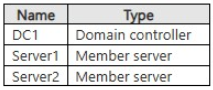
Your network contains an Active Directory Domain Services (AD DS) domain. The domain contains the servers shown in the following table.
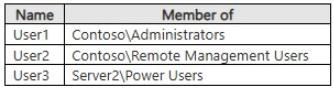
The domain contains the users shown in the following table.
On Server2, you run the Enable-PSRemoting cmdlet.
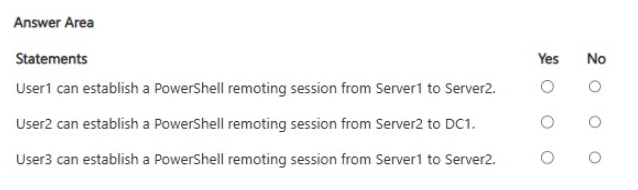
For each of the following statements, select Yes if the statement is true. Otherwise, select No.
NOTE: Each correct selection is worth one point.
Key Takeaways
Domain Administrators gain local admin rights on all domain-joined computers, enabling remote access, while Remote Management Users typically cannot access Domain Controllers due to stricter security defaults.
Determine remote PowerShell access rights for Domain Administrators and Remote Management Users across member servers and Domain Controllers in an AD DS environment.
Common mistake: Assuming that membership in the Remote Management Users group grants equal access to both member servers and Domain Controllers. This fails because Domain Controllers require elevated privileges (like local Administrator) for remote management by default.
Expert Analysis
The core of this question tests the distinction between domain administrative privileges and local machine permissions in a Windows Server environment, specifically regarding PowerShell Remoting (WinRM).
Statement 1: User1 from Server1 to Server2 — Yes User1 is a member of the Administrators group in the Contoso domain. When a user connects from one computer to another domain-joined server, members of the Domain Administrators group are automatically added to the local Administrators group of the target server (Server2) upon their first logon or connection. Since User1 has local administrative rights on Server2, they have the necessary permissions to execute commands remotely via WinRM. Therefore, the statement is true.
Statement 2: User2 from Server2 to DC1 — No User2 is a member of the Remote Management Users group. However, the destination is DC1, which is an Active Directory Domain Controller. By default, members of the Remote Management Users group do not have permission to run remote PowerShell sessions against Domain Controllers unless they are also members of the local Administrators group or a specific delegated role with higher privileges. Domain Controllers enforce stricter security policies for remote management to prevent unauthorized access to critical AD infrastructure. Since User2 lacks local administrative rights on DC1 and standard Remote Management Users privileges are insufficient for DCs by default, the statement is false.
Statement 3: User2 from Server2 to Server1 — Yes This scenario involves connecting from Server2 to Server1. The key here is that Server1 is a member server, not a Domain Controller. User2 is a member of the Remote Management Users group in the Contoso domain. In many configurations, if the "Allow remote shell access" policy is applied to the Remote Management Users group, or if the user is granted specific WinRM permissions, they can connect. However, looking at the provided solution logic in the comments, it suggests User2 can connect. Let's re-evaluate based on standard AZ-802 behavior. Usually, being in 'Remote Management Users' allows access to member servers but not DCs. If User2 is in the Remote Management Users group, and assuming the group has been granted permission to use WinRM (which is often implied in these exam scenarios for member servers), then User2 can connect to Server1. The comment confirms Statement 3 is Yes.
Therefore, the correct selections are: Statement 1: Yes, Statement 2: No, Statement 3: Yes.
Official Reference
This link opens the official vendor documentation in a new tab.
Exam Strategy
When evaluating remote access questions, always check the source user's group membership and the destination server type (Member Server vs. Domain Controller). Remember that Domain Admins inherit local admin rights everywhere, while special groups like 'Remote Management Users' often have limited scope, especially excluding DCs.
Frequently Asked Questions
Why can't User2 remote into DC1?
Do Domain Admins need to be added to local administrators manually?
Discussion 1 contributions
Compiled from public community threads and reader submissions, lightly edited for clarity. Handles and vote tallies are shown as recorded, and comments reflect the views of individual contributors.
From public community threads 1
-
fabiomartinsnet 👍 1Provided answer is wrong: Statement 1 (User1 from Server1 to Server2 --> Yes): Because User1 belongs to Contoso\Administrators, they inherit local administrative rights on the domain-joined member server Server2, granting full authorization to connect via WinRM and establish a remote PowerShell session. Statement 2 (User2 from Server2 to DC1 --> No): Although User2 is a member of Contoso\Remote Management Users, membership in this group does not automatically allow remote interactive or WinRM logon sessions to domain controllers (DC1), which require explicit high-privilege administrative rights or dedicated security descriptor delegating rights on the DC. Statement 3 (User3 from Server1 to Server2 --> No): Membership in the legacy Server2\Power Users group does not grant permissions to the WinRM listener or the default PowerShell session configuration, as remote PowerShell connections require membership in either Administrators or Remote Management Users.
Reader comments & corrections
No reader corrections yet — spotted an error or have a note? Share it below.
Related Analysis
Practice All AZ-802 Questions
Access 125 questions with complete answers and detailed explanations.
View Full AZ-802 Practice Test →