Entra ID P2S VPN Client Compatibility on macOS
Short answer
B Install the OpenVPN client on Device1 to enable Microsoft Entra ID authentication for the Point-to-Site VPN connection.
Question
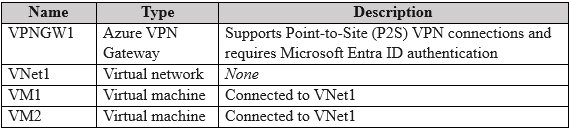
Key Takeaways
The core concept tested is the interoperability between Azure P2S authentication methods and operating system native clients; the trap is assuming native IKEv2 works with Entra ID without installing the required third-party client.
This question addresses Azure Point-to-Site (P2S) VPN configuration using Microsoft Entra ID authentication and the specific client requirements for macOS devices. It establishes that while IKEv2 supports certificate auth, Entra ID requires the OpenVPN client on macOS.
Common mistake: Learners often select Option C because they associate macOS VPN connections with X.509 certificates, failing to recognize that the scenario explicitly mandates Entra ID authentication which does not support native IKEv2 on macOS.
Expert Analysis
Why the Answer Is Correct
The solution requires connecting a macOS device to an Azure VNet via a P2S gateway configured for Microsoft Entra ID authentication. According to Microsoft documentation, the native IKEv2 client on macOS does not support Microsoft Entra ID authentication protocols. Therefore, the only supported client software for this specific setup on macOS is the OpenVPN client. Installing the OpenVPN client allows the device to authenticate via Entra ID and connect to the VNet, satisfying the requirement to minimize administrative effort by using the standard supported path.Why the Other Options Are Wrong
Option A suggests deploying a RADIUS server, which adds significant administrative overhead and complexity compared to using the built-in Entra ID authentication already configured. Option C involves adding an X.509 certificate, which would be correct if the VPN were configured for Certificate Authentication instead of Entra ID, but it will not work for Entra ID auth. Option D refers to configuring Device settings in the admin center, which is unrelated to establishing the initial VPN client connection on the endpoint.Community Comment Notes
Community consensus strongly favors Option B, noting that the presence of the Entra ID authentication method is the deciding factor. As one user noted, "The Mac has to be able to authenticate with Entra ID... The answer with least admin effort is to 'Install the Open VPN client'". Another comment correctly points out that the native client installed (IKEv2) is incompatible with the chosen authentication method, reinforcing the need for the OpenVPN client.Official Reference
https://learn.microsoft.com/en-us/azure/vpn-gateway/vpn-gateway-point-to-site-openvpn-macos
This link opens the official vendor documentation in a new tab.
Exam Strategy
Always check the authentication method specified for the P2S gateway first. If it is Microsoft Entra ID, remember that macOS requires the OpenVPN client, whereas Windows can use the native IKEv2 or OpenVPN clients.
Frequently Asked Questions
Why can't I use the native IKEv2 client on macOS?
Does this apply to Windows devices too?
Community Votes
100% of anonymous learners picked answer B. Votes are pick records left by other test-takers — they are not the verified answer.
Discussion 3 contributions
Compiled from public community threads and reader submissions, lightly edited for clarity. Handles and vote tallies are shown as recorded, and comments reflect the views of individual contributors.
From public community threads 3
-
e6d6bf4 👍 6 Answered BThe question is saying your P2S VPN (VPNGW1) is configured for Entra ID authentication. However, the Mac (Device1) is only has IKEv2 VPN client installed (use for cert auth) The question is asking to allow Device1 to be able to connect to VNET1 using VPNGW1 which mean the Mac has to be able to authenticate with Entra ID. --> The answer with least admin effort is to "Install the Open VPN client" on the Mac which is Azure VPN client https://learn.microsoft.com/en-us/azure/vpn-gateway/point-to-site-entra-vpn-client-mac
-
prekair0 👍 1 Answered Chttps://learn.microsoft.com/en-us/azure/vpn-gateway/point-to-site-vpn-client-cert-mac
-
bobothewiseman 👍 1 Answered BB. Install OpenVPN
Reader comments & corrections
No reader corrections yet — spotted an error or have a note? Share it below.
Related Analysis
Practice All AZ-700 Questions
Access 100 questions with complete answers and detailed explanations.
View Full AZ-700 Practice Test →