RDP Shortpath Eligibility: Client, Host Setting, and Network Path
Short answer
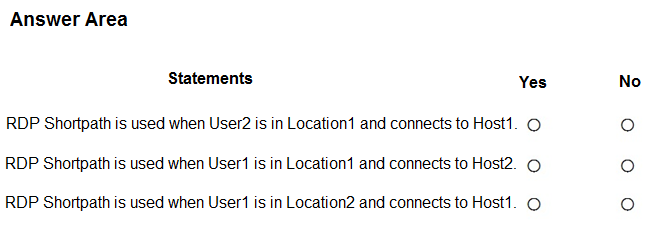
No, No, Yes: User2 cannot use RDP Shortpath through the web client; User1 cannot use managed-network RDP Shortpath to Host2 from Location1 because Host2 lacks that setting; and the Windows client can use public-network RDP Shortpath automatically via STUN/TURN.
Question
You have an Azure Virtual Desktop deployment that contains the session hosts shown in the following table.

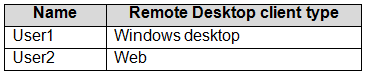
You have the users shows in the following table.
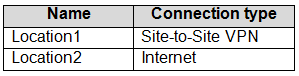
Users connect to Azure from the locations shown in the following table.
For each of the following statements, select Yes if the statement is true. Otherwise, select No.
NOTE: Each correct selection is worth one point.
Key Takeaways
It tests that RDP Shortpath is gated separately by client support, host-pool managed-network configuration, and public versus private path; the trap is treating all Shortpath as managed-only or assuming the web client qualifies.
This hotspot asks which Azure Virtual Desktop connections qualify for RDP Shortpath. The correct selections are No, No, and Yes, based on web-client support, Host2's missing managed-network setting, and automatic public STUN/TURN Shortpath.
Common mistake: A common error is answering Yes for User2 because Location1 is a managed network, or answering No for the public connection because there is no VPN; the web client never supports Shortpath, while public STUN/TURN Shortpath does not require the managed-network setting.
Expert Analysis
Two independent Shortpath paths RDP Shortpath is not a single switch. Azure Virtual Desktop supports RDP Shortpath for managed networks, where the client and session host reach each other over private connectivity such as VPN or ExpressRoute, and RDP Shortpath for public networks, which uses STUN/TURN over the internet. The managed-network path requires the host pool setting to be enabled. The public path works automatically when the client and network permit it and does not depend on that managed-network host-pool setting.
Client support is a hard gate The web client does not support RDP Shortpath. Therefore, the statement involving User2 resolves to No even though User2 connects from Location1, which is a managed network. A discussion comment makes this exact point: the web client cannot use Shortpath despite the managed-network location. Another comment treats the managed-network setting as decisive, but that is only one part of the eligibility check.
Host2 lacks the managed-network setting Host2 is not configured for RDP Shortpath for managed networks. When User1 connects from Location1, the relevant path is the private/managed path, so Host2 cannot use managed-network Shortpath. The correct selection is No. The discussion comment that Host2 is simply not configured for RDP Shortpath is directionally right for this managed-path statement.
Public STUN/TURN behavior The public-network statement resolves to Yes. A supported client, such as the Remote Desktop client for Windows, can use RDP Shortpath for public networks through STUN/TURN without additional host-pool configuration. Comments that reject this because there is no site-to-site VPN are applying managed-network rules to the public path, which is the key trap in this hotspot. The overall selections are No, No, Yes.
Official Reference
https://learn.microsoft.com/en-us/azure/virtual-desktop/configure-rdp-shortpath?tabs=public-networks
This link opens the official vendor documentation in a new tab.
Exam Strategy
For Shortpath hotspot items, evaluate three gates in order: client type, host-pool managed-network setting, and whether the connection path is private or public. Eliminate any statement using the web client immediately, then decide whether the statement is about managed-network Shortpath or public STUN/TURN Shortpath instead of treating them as one feature.
Frequently Asked Questions
Does the Remote Desktop web client support RDP Shortpath?
Does public-network RDP Shortpath require the managed-networks host-pool setting?
Why is Host2 unable to use RDP Shortpath from Location1?
Discussion 19 contributions
Compiled from public community threads and reader submissions, lightly edited for clarity. Handles and vote tallies are shown as recorded, and comments reflect the views of individual contributors.
From public community threads 19
-
Dan_Turnbull 👍 30no - User 2 won't work as RDP Shortpath requires Remote Desktop Client for Windows no - Host 2 isn't configured for RDP Shortpath no - RDP Shortpath for managed networks requires a site to site vpn
-
scottims 👍 28no - user 2 is not using remote desktop client for windows no - host 2 is not configured for RDP Shortpath yes - RDP Shortpath for public networks with STUN or TURN will work automatically without any additional configuration https://learn.microsoft.com/en-us/azure/virtual-desktop/configure-rdp-shortpath?tabs=public-networks
-
compnerd916 👍 5This is a trick question. RDP Shortpath does not need to be configured for managed networks to work. So the image showing the RDP Shortpath config for managed networks is a decoy. If a managed network isn't an option it will use the public internet. The key is the client in Windows must be used and web client does not work.
-
bobosmith1975 👍 5disagree. the question specifically mentions shortpath for managed networks which does not apply over public internet - location 2 is public internet so that would be 'no'
-
Bonesurfer 👍 2N - DP Shortpath requires both the connection to be from a managed network and a compatible client. Since User2 is using the Web Remote Desktop client, which does not support RDP Shortpath, RDP Shortpath will not be used, even though they are connecting from a managed network (Location1). N - Host2 does not have RDP Shortpath for managed networks enabled. For RDP Shortpath to work, it must be enabled on both the session host and require a compatible client from a managed network. Since Host2 does not meet this requirement, RDP Shortpath will not be used. N - RDP Shortpath only works over managed networks, such as connections through a Site-to-Site VPN or ExpressRoute. Since Location2 is an Internet connection, it is considered an unmanaged network, and thus RDP Shortpath will not be used, even though Host1 has it enabled. https://learn.microsoft.com/en-us/azure/virtual-desktop/rdp-shortpath?tabs=managed-networks#how-rdp-shortpath-works
Show 14 more comments
-
MarioGaming110 👍 2The answer is correct because: In the first case and third case RDP Shortpath uses VPN Site-To-Site in which connectivity is established between the client and the session host, precisely via a VPN, indidpendently whether Windows desktop or web. The second case, on the other hand, is much simpler to understand because the user has to connect via the Web or via the remote desktop client app to an Internet-exposed resource, so if RDP Shortpath for managed networks is not configured, it will never log in. You have to configure RDP Shortpath for public networks. https://learn.microsoft.com/en-us/azure/virtual-desktop/rdp-shortpath?tabs=managed-networks#how-rdp-shortpath-works
-
mr_Mojo 👍 2I agree with NNY for the same reasons mentioned here. Just to add for the 2nd NO - If the RDP Shortpath for managed networks is disabled or not configured, per the policy, the clients will not use it.
-
hawkens 👍 1RDP Shortpath can be used in two ways: Managed networks, where direct connectivity is established between the client and the session host when using a private connection, such as a virtual private network (VPN). Public networks, where direct connectivity is established between the client and the session host when using a public connection. There are two connection types when using a public connection, which are listed here in order of preference: A direct UDP connection using the Simple Traversal Underneath NAT (STUN) protocol between a client and session host. An indirect UDP connection using the Traversal Using Relay NAT (TURN) protocol with a relay between a client and session host. This is in preview.
-
oktober_23 👍 1i think it may be no - user 2 is not using remote desktop client for windows yes - RDP shortpath is enabled, but not configured for managed networks for Host 2 so should still connect no - RDP shortpath for managed networks is enabled, but won't work for public network at Location 2 Host 1 has a stricter connection rule while Host 2 is free for all.
-
oktober_23 👍 1i believe this is correct because if "Enable RDP Shortpath for managed networks" is not configured or disabled, the clients wont use this policy to connect therefore it will connect via the public network
-
07d02a2 👍 1Microsoft indeed now also supports RDP Shortpath for public networks, but that is a different feature. Since the question explicitly says managed networks, an Internet connection does not qualify.
-
DC095 👍 1RDP shortpath for public networks will work automatically as long as session hosts can connect outbound to the internet and the ICE/STUN/Turn servers. Listener and inbound ports not required.
-
oktober_23 👍 1it works over public networks as well https://learn.microsoft.com/en-us/azure/virtual-desktop/rdp-shortpath?tabs=public-networks#how-rdp-shortpath-works
-
manhattan 👍 1I think it is correct https://learn.microsoft.com/en-us/azure/virtual-desktop/rdp-shortpath?tabs=managed-networks
-
ZokiZokic2023 👍 1Answer is correct: https://learn.microsoft.com/en-us/azure/virtual-desktop/rdp-shortpath?tabs=managed-networks
-
Ivanvazovv 👍 1No it won't work automatically WITHOUT any configuration. It needs configuration.
-
picho707 👍 1RDP Shortpath only works over managed networks S2S VPN or ExpressRoute.
-
AKov77777 👍 1Looks like RDP shortpath doesn't support Web browsers at all
-
Ivanvazovv 👍 1RDP shortpath for managed networks is turned on by default.
Reader comments & corrections
No reader corrections yet — spotted an error or have a note? Share it below.
Related Analysis
Practice All AZ-140 Questions
Access 64 questions with complete answers and detailed explanations.
View Full AZ-140 Practice Test →