Where Do You Enable App1 Managed Identity and Clipboard Redirection in AVD?
HOTSPOT
You have an Azure Virtual Desktop deployment that contains the resources shown in the following table.
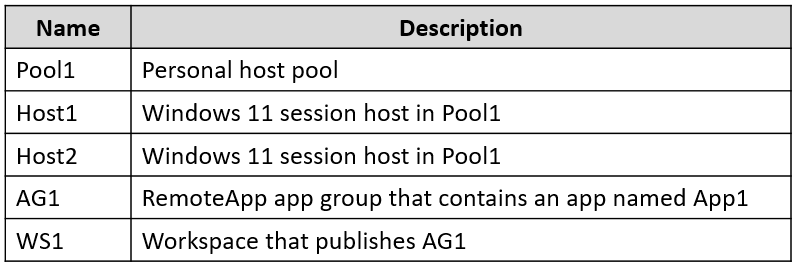 You need to perform the following configurations:
• Enable a managed identity for App1.
• Enable Clipboard redirection for App1.
On which resources should you perform the configurations? To answer, select the appropriate options in the answer area.
NOTE: Each correct selection is worth one point.
You need to perform the following configurations:
• Enable a managed identity for App1.
• Enable Clipboard redirection for App1.
On which resources should you perform the configurations? To answer, select the appropriate options in the answer area.
NOTE: Each correct selection is worth one point.
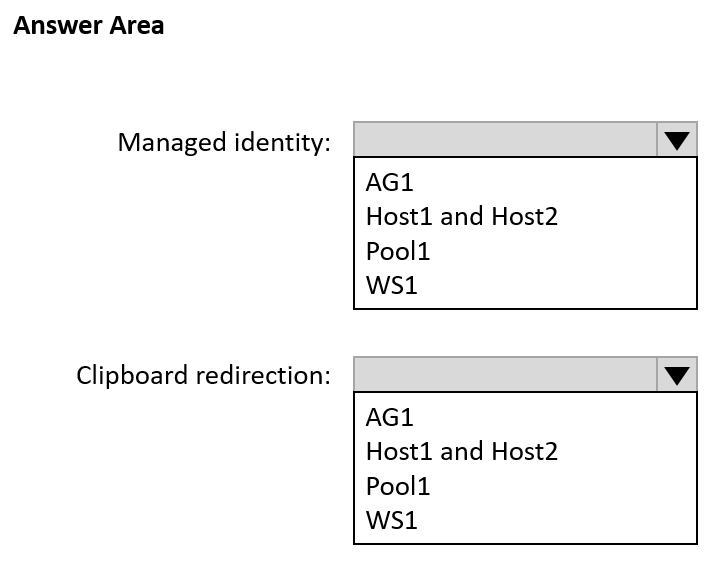
Community Insight
The item tests whether you separate compute-scoped managed identity from host-pool-scoped RDP redirection; the trap is assigning the identity to the application group or setting clipboard per session host.
This AZ-140 hotspot item asks which resources receive App1's managed identity and clipboard redirection settings in an AVD deployment. The page establishes that the identity is configured on the session hosts Host1 and Host2, while clipboard redirection is enabled in Pool1's host pool RDP properties.
A common wrong approach is treating App1 as an App Service or assigning its managed identity to the application group or workspace, and configuring clipboard redirection on each session host instead of in Pool1's RDP properties.
Community Discussion (7 comments)
Comments & Corrections
No comments yet — spotted an error or have a note? Share it below.
Expert Analysis
Why the Answer Is Correct
App1 is a RemoteApp that runs on the session hosts, so the managed identity that the application uses is the identity assigned to the underlying Azure VM/session host, not to the AVD application group or workspace. That makes Host1 and Host2 the correct configuration targets for the managed identity. Clipboard redirection is not configured separately on each session host; it is an RDP property of the host pool, so Pool1 is the correct target. The host pool's RDP properties apply to all session hosts in Pool1 and are where device redirection settings such as clipboard are enabled.Why Other Candidate Answers Are Wrong
Assigning the managed identity to App1's application group or workspace is wrong because those AVD objects do not host the application process and do not expose a managed identity that the RemoteApp can use. Configuring clipboard redirection on Host1 and Host2 individually is also wrong because AVD centralizes RDP device redirection in the host pool's RDP properties. Choosing an App Service managed identity is a distractor: App1 is not an Azure App Service app, it is a RemoteApp on AVD session hosts. If the dropdown offers a host pool for the identity or session hosts for clipboard, those pairings invert the two scopes.Community Comment Notes
panterpansn and pangchn correctly steer clipboard redirection to Pool1, with pangchn clarifying it is "device redirction under the Host pool settings" rather than a per-host RDS setting. 17Master summarizes the split as Box1: Host1 and Host2, Box2: Pool1, which matches the two configuration scopes. DallasM explains that because App1 is a RemoteApp on session hosts, its managed identity is tied to the VM/session host, not to the application group or workspace. ce82cc2's App Service managed identity link is a useful caution but does not apply because AVD RemoteApps are not App Service workloads.Official Reference
Exam Strategy
Separate the two scopes before answering: application identity is a property of the compute resource, the session host VM, while redirection is a host-pool RDP property inherited by all session hosts. Check whether each dropdown names a session host, host pool, application group, or workspace before choosing.
Frequently Asked Questions
Why isn't App1's managed identity assigned on the AVD application group or workspace?
Because App1 is a RemoteApp running on session hosts, the managed identity belongs to the Azure VM/session host that runs the app, not to the AVD application group or workspace.
Where exactly is Clipboard redirection enabled for an AVD host pool?
In the host pool's RDP properties under device redirection settings; all session hosts in Pool1 inherit that configuration.
Related Analysis
Practice All AZ-140 Questions
Access 64 questions with complete answers and detailed explanations.
View Full AZ-140 Practice Test →