Can User1, User2, and User3 Use FSLogix Profiles on Their Hosts?
HOTSPOT
You have an Azure subscription that is linked to a hybrid Microsoft Entra tenant.
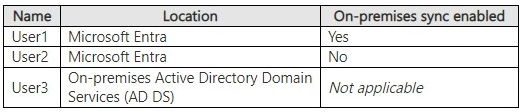
You have the user accounts shown in the following table.
 You have an Azure Virtual Desktop deployment that uses FSLogix profiles and contains the host pools shown in the following table.
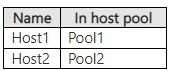
 The host pools contain the session hosts shown in the following table.
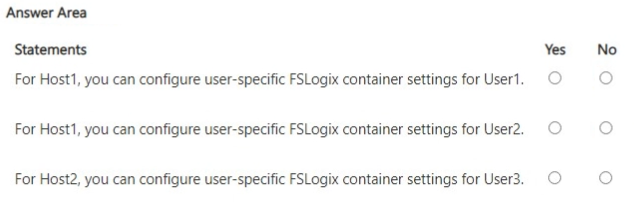
 For each of the following statements, select Yes if the statement is true. Otherwise, select No.
NOTE: Each correct selection is worth one point.
For each of the following statements, select Yes if the statement is true. Otherwise, select No.
NOTE: Each correct selection is worth one point.
Community Insight
It tests FSLogix identity prerequisites against host join type, and the trap is assuming a cloud-only Entra account works simply because the session host is Entra-joined.
This AZ-140 hotspot asks whether three named users can use FSLogix profiles on specific session hosts. The page establishes Yes/No/Yes: hybrid and AD DS identities succeed, while cloud-only User2 fails on Entra-joined Host1.
Assuming any Microsoft Entra user can open an FSLogix profile on an Entra-joined session host; cloud-only accounts lack the AD DS-backed identity/SID needed for the profile share and object-specific settings.
Community Discussion (6 comments)
Comments & Corrections
No comments yet — spotted an error or have a note? Share it below.
Expert Analysis
Why the Answer Is Correct
The scenario pairs a hybrid AD DS-synced user (User1) with an Entra-joined host (Host1) and a domain user (User3) with an AD DS-joined host (Host2). FSLogix profile containers depend on NTFS/share permissions tied to an AD DS-backed identity; User1 has that via sync and User3 has it natively, so both can access their profiles. User2 is cloud-only, so the profile share cannot resolve an AD DS SID for that account, making the Host1/User2 combination No. This yields Yes, No, Yes for the three statements.Why Other Candidate Answers Are Wrong
A No/No/Yes pattern assumes no Entra-joined session host can use FSLogix, but supported Azure Files Entra Kerberos with hybrid identities allows exactly the User1/Host1 case. A Yes/Yes/Yes pattern incorrectly treats all Entra identities as equivalent and ignores that User2 is cloud-only. Any answer that marks User3 No on Host2 ignores that an AD DS-joined host with a domain user is the most traditional supported FSLogix configuration.Community Comment Notes
sojorow324's note about "User-specific FSLogix container settings" requiring AD DS is a useful caution but too broad if applied to every profile-access statement. hwoccurrence maps the same Host1/User1, Host1/User2, and Host2/User3 pairs to Yes/No/Yes, which matches the supported identity model. d7b83e2's question about the second statement is answered by the cloud-only status of User2: there is no AD DS-backed identity for the profile permissions. DallasM's warning about hybrid Entra join is relevant in real deployments, but for this scenario the hybrid User1 and AD DS User3 are the identities that satisfy FSLogix requirements.Official Reference
Exam Strategy
Map each user's identity source to the session host's join type before answering; the traps hinge on hybrid versus cloud-only. Remember that a hybrid Entra identity carries an AD DS SID, while a cloud-only Entra identity does not.
Frequently Asked Questions
Why can't cloud-only User2 use an FSLogix profile on the Entra-joined Host1?
FSLogix profile access depends on an AD DS-backed identity or supported Entra Kerberos hybrid identity; a cloud-only Entra account lacks the AD DS SID that profile share permissions require.
Does Host1 being Entra-joined mean no FSLogix profiles can work there?
No. With supported Azure Files Entra Kerberos and a hybrid synced identity such as User1, FSLogix profile access can work on an Entra-joined session host.
Related Analysis
Practice All AZ-140 Questions
Access 64 questions with complete answers and detailed explanations.
View Full AZ-140 Practice Test →