Azure VM Series Selection for AVD Host Pools
Short answer
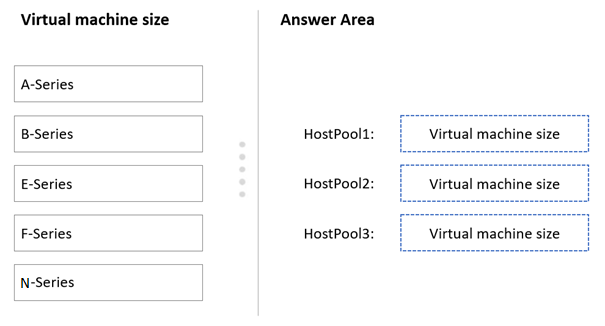
HostPool1 requires F-Series (Compute Optimized) VMs; HostPool2 requires E-Series (Memory Optimized) VMs; HostPool3 requires N-Series (GPU Optimized) VMs.
Question
You have an Azure Virtual Desktop deployment.
You plan to create the host pools shown in the following table.
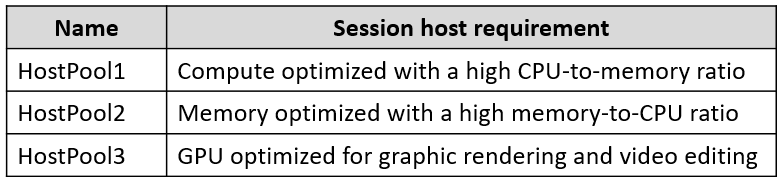
You need to recommend the virtual machine size for each host pool to meet the session host requirements.
Key Takeaways
Test-takers must match workload types to VM optimization profiles: F-series for CPU-heavy tasks, E-series for memory-heavy tasks, and N-series for GPU-accelerated graphics.
Determines the correct Azure Virtual Machine series (F, E, N) for Azure Virtual Desktop host pools based on compute, memory, and GPU requirements.
Common mistake: Confusing F-Series (Compute Optimized) with D-Series (General Purpose). D-series have balanced resources, whereas F-series are specifically tuned for high CPU-per-memory ratios, which is critical for certain AVD session hosts.
Expert Analysis
The question requires mapping specific Azure Virtual Desktop (AVD) host pool requirements to the appropriate Azure Virtual Machine (VM) series based on workload characteristics. This is a Drag-and-Drop task where the candidate must select the correct VM series for each host pool.
The core logic relies on understanding the optimization profiles of Azure VM families:
- F-Series: These are Compute Optimized. They feature a high CPU-to-memory ratio, making them ideal for batch processing, build servers, and other compute-intensive workloads. If a host pool requires high CPU performance relative to memory usage, the F-Series is the correct choice.
- E-Series: These are Memory Optimized. They provide a higher memory-to-CPU ratio, suitable for in-memory databases, real-time analytics, and large-scale caching. If a host pool's sessions require significant RAM (e.g., for heavy Excel macros or data analysis), the E-Series is required.
- N-Series: These are GPU Optimized. They include NVIDIA GPUs, designed for graphics rendering, video encoding/decoding, and scientific computing. If the AVD deployment involves 3D applications, CAD, or gaming, the N-Series is necessary.
Common mistakes involve confusing Compute Optimized (F-series) with General Purpose (D-series) or failing to recognize that "high CPU per memory" specifically points to F-series rather than D-series. The comments confirm this mapping: HostPool1 uses F-Series, HostPool2 uses E-Series, and HostPool3 uses N-Series. Candidates should utilize the "Open Book" exam mode to verify these specifications against the official Azure VM sizes documentation if unsure.
Official Reference
- https://learn.microsoft.com/en-us/azure/virtual-machines/sizes/overview?tabs=breakdownseries%2Cgeneralsizelist%2Ccomputesizelist%2Cmemorysizelist%2Cstoragesizelist%2Cgpusizelist%2Cfpgasizelist%2Chpcsizelist
- https://azure.microsoft.com/en-us/pricing/details/virtual-machines/series/
These links open the official vendor documentation in a new tab.
Exam Strategy
When faced with VM selection questions, identify the primary bottleneck or requirement of the workload. If it mentions 'high CPU', 'batch processing', or 'compute intensive', choose F-Series. If it mentions 'in-memory', 'database', or 'memory intensive', choose E-Series. If it mentions 'graphics', 'video', or '3D', choose N-Series. Use the exam's open-book resource to quickly cross-reference these definitions.
Frequently Asked Questions
What is the difference between F-Series and D-Series VMs?
Can I use N-Series for standard office AVD users?
Discussion 6 contributions
Compiled from public community threads and reader submissions, lightly edited for clarity. Handles and vote tallies are shown as recorded, and comments reflect the views of individual contributors.
From public community threads 6
-
pgonzalez 👍 13Correct: F-series are VMs optimized to process, with a higher CPU-per-memory. E-series are optimized for heavy memory usage. N-series have GPU funcionalities.
-
trashbox 👍 7The answers are correct. During the exam, you can quickly find the answer by looking up the "Sizes for virtual machines in Azure" page, using the Open Book function. https://learn.microsoft.com/en-us/azure/virtual-machines/sizes
-
kshum 👍 7https://azure.microsoft.com/en-us/pricing/details/virtual-machines/series/
-
17Master 👍 3Correcto
-
DallasM 👍 1Answer provided is correct. A good video explaining the different series can be found here: https://learn.microsoft.com/en-us/azure/virtual-machines/sizes/overview?tabs=breakdownseries%2Cgeneralsizelist%2Ccomputesizelist%2Cmemorysizelist%2Cstoragesizelist%2Cgpusizelist%2Cfpgasizelist%2Chpcsizelist
Show 1 more comment
-
Lewis_Ibbitson 👍 1HostPool1: F-Series HostPool2: E-Series HostPool3: N-Series
Reader comments & corrections
No reader corrections yet — spotted an error or have a note? Share it below.
Related Analysis
Practice All AZ-140 Questions
Access 64 questions with complete answers and detailed explanations.
View Full AZ-140 Practice Test →