Azure Virtual Desktop Storage Account Selection
Short answer
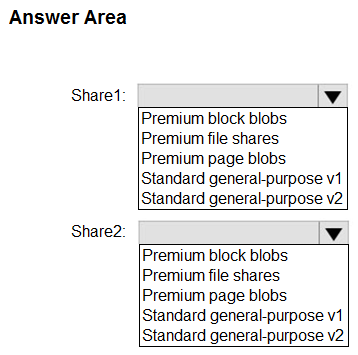
For Share1, recommend Premium file shares because they provide SSD-backed storage required for performance. For Share2, recommend Standard general-purpose v2 storage accounts to enable HDD storage with flexible tier switching capabilities.
Question
You plan to deploy two Azure file shares named Share1 and Share2 that will be used with Azure Virtual Desktop. Share1 will contain at least 100 GB of data and must be stored on SSDs. Share2 must be able to switch between Transaction optimized and Cool storage tiers and must be stored on HDDs.
You need to recommend which type of storage accounts to use for the shares. The solution must minimize costs.
What should you recommend for each share? To answer, select the appropriate options in the answer area.
NOTE: Each correct selection is worth one point.
Key Takeaways
Tests the distinction between Premium (SSD-only) and Standard (HDD-based) file share architectures and their associated storage account types, specifically focusing on tier mobility and cost minimization.
Determines the correct Azure storage types for AVD file shares based on SSD/HDD requirements and tier switching needs. Share1 uses Premium file shares, while Share2 uses Standard general-purpose v2.
Common mistake: Selecting Standard general-purpose v2 for Share1. This fails because Standard accounts primarily use HDDs, violating the explicit SSD requirement for Share1. Users often overlook the hardware backing difference between Premium and Standard offerings.
Expert Analysis
The scenario requires selecting Azure Storage Account types that satisfy specific performance, hardware, and cost constraints for two distinct file shares in an Azure Virtual Desktop (AVD) environment.
Share1: Premium File Shares The requirement specifies SSD-backed storage with a minimum capacity of 100 GB. Standard storage accounts use HDDs for their base tier, which fails the hardware constraint. Premium file shares are explicitly backed by Solid State Drives (SSDs), providing the high IOPS and low latency necessary for AVD session hosts. Furthermore, Premium file shares have a minimum size threshold (typically 100 GB or 1 TB depending on configuration), aligning with the data volume. This choice ensures the performance requirements are met while adhering to the SSD mandate.
Share2: Standard General-purpose v2 This share requires HDD storage and the ability to switch between Transaction-optimized and Cool tiers. Standard general-purpose v2 (GPv2) accounts support both standard file shares (HDD-based) and premium file shares. Crucially, GPv2 accounts allow users to toggle the access tier (Hot/Cool/Archive) for blob storage and manage file share performance tiers (Transaction-optimized vs. Hot/Cool). Since the prompt mandates HDDs, we select the standard file share option within a GPv2 account. This is more cost-effective than Premium storage for non-critical, tier-switchable data.
Why not other options? Standard general-purpose v1 does not support the new cool tier switching flexibility as seamlessly or cost-effectively as v2. Premium storage accounts do not offer HDD tiers. Therefore, mapping Share1 to Premium and Share2 to Standard GPv2 is the only solution that satisfies all hardware, feature, and cost constraints.
Official Reference
- https://learn.microsoft.com/en-us/azure/storage/files/storage-how-to-create-file-share?tabs=azure-portal
- https://learn.microsoft.com/en-us/azure/storage/files/storage-files-planning
These links open the official vendor documentation in a new tab.
Exam Strategy
When evaluating storage for VDI workloads, always check the underlying media type first (SSD vs. HDD). If high performance or SSDs are mandated, immediately filter for Premium offerings. If cost and tier flexibility are prioritized over raw speed, look for Standard General-purpose v2. Map these technical constraints directly to the exam's 'minimize cost' directive by avoiding Premium where unnecessary.
Frequently Asked Questions
Can Standard General-purpose v2 support SSDs?
Why not use Premium Storage Account for Share2?
Discussion 6 contributions
Compiled from public community threads and reader submissions, lightly edited for clarity. Handles and vote tallies are shown as recorded, and comments reflect the views of individual contributors.
From public community threads 6
-
jcxxxxx2020 👍 14Passed the exam last Jan 28 2023 and this question is included. Provided answer is correct.
-
pgonzalez 👍 6Correct: https://learn.microsoft.com/en-us/azure/storage/files/storage-how-to-create-file-share?tabs=azure-portal
-
Rednevi 👍 2Share1 Requirement: Must be on SSDs and at least 100 GB in size. Recommended Type: Premium file shares (backed by SSDs). Share2 Requirement: Must be able to switch between Transaction-optimized and Cool tiers (HDD-based). Recommended Type: Standard general-purpose v2 (standard file shares support tier changes and are HDD-based).
-
Murad01 👍 2Given answers are correct
-
ESAJRR 👍 1Share1: Premium file shares Share2: Standard general-purpose v2
Show 1 more comment
-
Lewis_Ibbitson 👍 1Answers are correct
Reader comments & corrections
No reader corrections yet — spotted an error or have a note? Share it below.
Related Analysis
Practice All AZ-140 Questions
Access 64 questions with complete answers and detailed explanations.
View Full AZ-140 Practice Test →