Azure Virtual Desktop Host Pool Load Balancing and Maximum Session Limit
Short answer
Configure HostPool1 to use breadth-first load balancing and set the maximum session limit to 20 sessions per host; if one of the four hosts fails, the remaining three hosts can still support all 60 sessions.
Question
You have an Azure Virtual Desktop host pool named HostPool1 that must support 60 sessions.
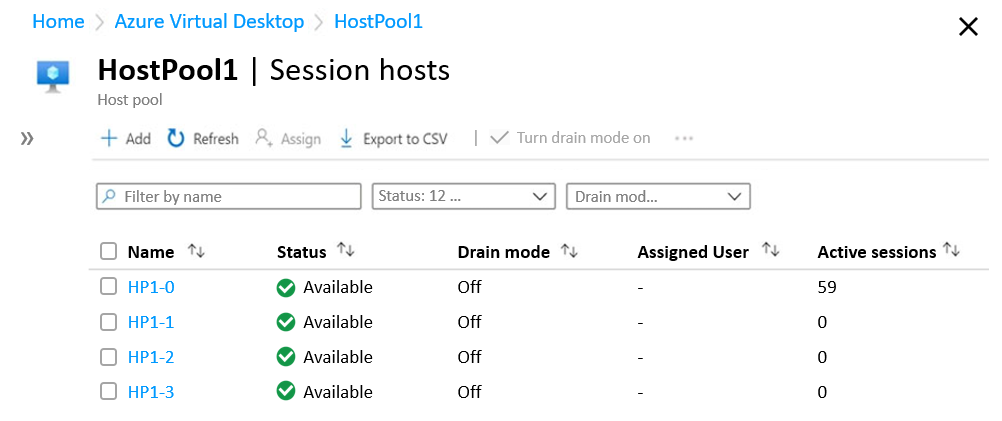
The session hosts for HostPool1 are configured as shown in the following exhibit.
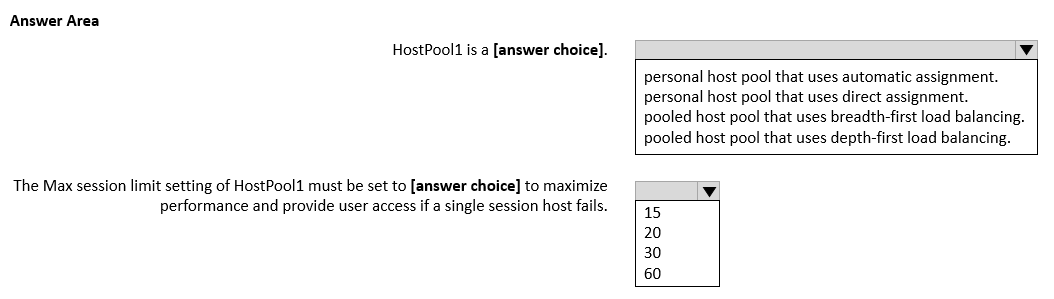
Use the drop-down menus to select the answer choice that completes each statement based on the information presented in the graphic.
NOTE: Each correct selection is worth one point.
Key Takeaways
The question tests converting a 60-session, four-host design with one-host failure tolerance into a per-host cap, while recognizing that breadth-first is the performance-oriented load-balancing mode.
This AZ-140 hotspot tests pooled host pool load balancing and per-host maximum session limits. The correct answer is breadth-first load balancing with a maximum session limit of 20, derived from 60 sessions divided across three surviving hosts.
Common mistake: Choosing 15 because 60 ÷ 4 = 15 ignores the failure requirement: with one host down, three hosts at 15 support only 45 sessions. Choosing 60 lets a single host absorb the pool and defeats performance and resilience.
Expert Analysis
Read the exhibit first. The pool contains four session hosts, and the graphic shows one host carrying 59 active sessions while the others are lightly used. That distribution is the signature of depth-first load balancing in a pooled host pool: the broker fills the first available host before moving to the next. A learner comment makes the same point—the 59 sessions are why the current configuration must be read as depth-first, not breadth-first.
First blank: performance means breadth-first. The statement asks what HostPool1 should use to maximize performance. In a pooled Azure Virtual Desktop host pool, breadth-first spreads new sessions across all available session hosts. Spreading the 60 users reduces CPU, memory, and disk contention on any one VM and avoids a hot host. Depth-first is useful when you want to consolidate users onto fewer hosts and shut down unused hosts, but that is a cost/consolidation choice, not a maximum-performance choice.
Second blank: size the cap for one failed host. The failure requirement changes the divisor. HostPool1 has four hosts and must still support 60 sessions if one host is unavailable, so only three hosts remain. The per-host maximum session limit must satisfy 3 × limit ≥ 60, giving limit = 20. With breadth-first and a 20-session cap, normal operation balances 60 users across four hosts (about 15 each), and if one host fails the other three can each absorb up to 20. Setting 15 would support 60 only with all four hosts healthy; after a failure, three hosts at 15 provide just 45 sessions. Setting 60 would let one host take the entire load, which contradicts both the performance goal and the failure-resilience requirement. A learner comment summarizes the same arithmetic: one host fails, leaving three hosts, and 3 × 20 = 60.
Result. The correct pair is breadth-first load balancing and a maximum session limit of 20 per session host.
Official Reference
https://learn.microsoft.com/en-us/azure/virtual-desktop/configure-host-pool-load-balancing
This link opens the official vendor documentation in a new tab.
Exam Strategy
For AVD capacity hotspots, identify whether the statement asks for the current observed behavior or the desired state. When a failure tolerance is stated, calculate capacity over N−1 hosts, not N: max session limit ≥ total sessions ÷ (hosts − 1). For pooled pools, map "maximum performance" to breadth-first and "consolidate/least hosts" to depth-first.
Frequently Asked Questions
Why is the maximum session limit 20 rather than 15?
What does the 59-session host in the exhibit indicate?
Why use breadth-first if the pool must support 60 sessions?
Discussion 19 contributions
Compiled from public community threads and reader submissions, lightly edited for clarity. Handles and vote tallies are shown as recorded, and comments reflect the views of individual contributors.
From public community threads 19
-
CARO54 👍 27depht-first 20
-
RDIO 👍 14Everything in your answer is so wrong it hurts. Please do not share answers like this. It just confuses people.
-
ShockWaveSix 👍 14It's asking about if a single Host fails. Which leaves 3 Hosts, not 4. 3x20=60
-
Kalzonee3611 👍 8Current setup is Depth as we can see 59 active sessions on one host 20 - It's asking for stability if a host fails. We have four host meaning one could fail and all 60 user would still have access
-
Judith1969 👍 5- Pooled host pool that uses depth-first (why else 59 sessions on 1 host?) - 20 sessions (= 60 sessions / 3 remaning hosts)
Show 14 more comments
-
pcc_rj 👍 5I'm wrong. Should be Depth- first and 20.
-
JOates1993 👍 4incorrect answer - Depth first
-
Josty 👍 4depth 60
-
manhattan 👍 4depth 15
-
VR 👍 3I think the first answer is incorrect it should be depth-first if you look at the image, all the sessions I logged on one host..
-
MENTHIS 👍 3Should be 60 and depth-first
-
Judith1969 👍 2(don't forget 'maximum performance', so 20 sessions
-
MENTHIS 👍 2Incorrect, should be depth-first
-
PPHammer 👍 1If the question asks about how the hostpool should be used to achieve max performance, that should be breadth first.(since one session host had less users if not all the 60 users are in the same shift. Lets say, there are 21 users/shift--> with breadth first: 7 users/session host) If the question asks about the current configuration, it is depth first.The question itself is not clear. The number of hosts should be set to 20/hosts since if there is one session goes offline, there should be enough session hosts to support 60 users -->3X20=60. So 20 users is definitely a good answer, however, about load balancing...the question is not clear. (for me)
-
c7d45f4 👍 1The Max session limit setting of Host must be set to 60 to maximize performance and provide user access if a single session host fails, because is a pooled host pool that uses breadth-first load balancing.
-
port389 👍 1Why 20 when there is 4 hosts? 15x4=60 the current config is depth but it should be changed to breadth.
-
ce82cc2 👍 1Breadth + 20 - if you want to increase performance, spread the connections across the hosts
-
Ivanvazovv 👍 1Depth, not Breadth.
-
pcc_rj 👍 1Correct.
Reader comments & corrections
No reader corrections yet — spotted an error or have a note? Share it below.
Related Analysis
Practice All AZ-140 Questions
Access 64 questions with complete answers and detailed explanations.
View Full AZ-140 Practice Test →