AZ-140 FSLogix and Data Disk Backup Vault Mapping
Short answer
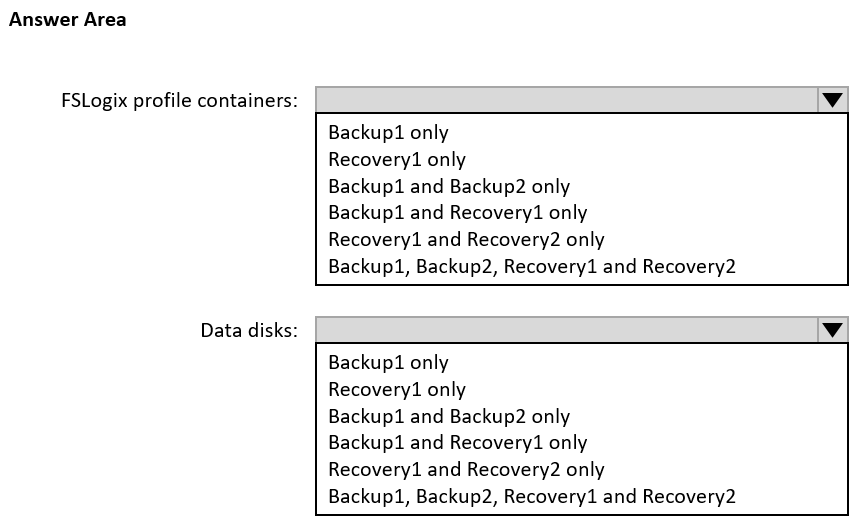
FSLogix profile containers used by HostPool1 can be backed up only to Recovery1; the data disks in HostPool2 can be backed up only to Backup1. Backup2 is excluded because it is in a different region, and a Recovery Services vault does not provide disk-only backup for those data disks.
Question
You have an Azure Virtual Desktop deployment that contains the resources shown in the following table.
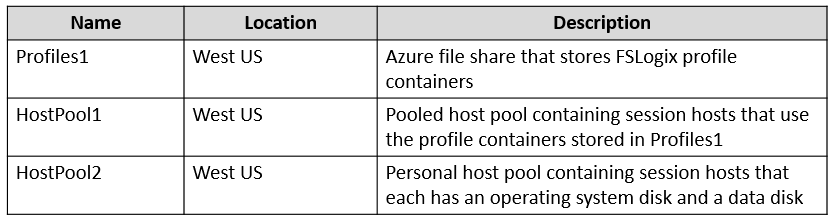
You create the resources shown in the following table.
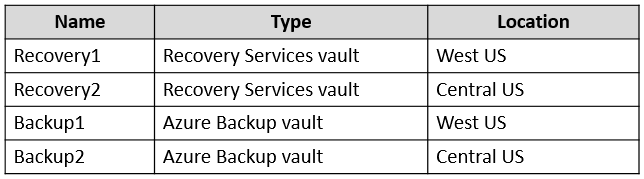
You need to meet following requirements:
• Back up the FSLogix profile containers used by HostPool1.
• Backup the data disks in HostPool2.
To which resources can you back up the profile containers and the data disks? To answer, select the appropriate options in the answer area.
NOTE: Each correct selection is worth one point.
Key Takeaways
It tests the split between Recovery Services vault Azure Files backup and Backup vault disk backup, with the same-region requirement eliminating Backup2.
This AZ-140 scenario tests whether you can map FSLogix profile-container data and AVD data disks to the correct Azure Backup vault type and region. The FSLogix containers can be backed up only to Recovery1, while the data disks can be backed up only to Backup1.
Common mistake: A common mistake is sending both workloads to the same vault or selecting Backup2. Azure Backup cannot back up an individual data disk with a Recovery Services vault as a disk-only item, and cross-region vault backup of these resources is not supported.
Expert Analysis
Read the requirement as two different data sources
The FSLogix profile containers for HostPool1 are not a virtual machine disk; they are VHDX files stored in an Azure file share. The data disks for HostPool2 are managed disks attached to session hosts. Azure Backup treats these as different protected items, so the vault choice depends on both the source type and the vault's region.
Apply vault-type support
A Recovery Services vault protects Azure Files, including the file share that holds FSLogix containers, so the profile-container backup belongs to Recovery1. A Backup vault supports Azure Disk backup, so the individual data disks in HostPool2 belong to Backup1. The reverse mappings fail: Backup1 does not provide the Azure Files protection needed for the FSLogix share, and Recovery1 cannot perform a disk-only backup of the HostPool2 data disks. A Recovery Services vault VM backup protects the whole VM, not the isolated disk item the question asks for.
Apply the same-region constraint
The protected resource and vault must be in the same region when backup is configured. Backup2 is a distractor because it is in a different region; cross-region restore is not the same as cross-region backup. Therefore Backup2 cannot protect HostPool2's data disks or HostPool1's file-share data in this scenario.
Eliminate the alternatives
The learner discussion converges on the same split: Azure Files needs the Recovery Services vault, disks need the Backup vault, and a different-region vault is invalid. The answer is FSLogix profile containers to Recovery1 only, and HostPool2 data disks to Backup1 only. No single vault satisfies both source types, and no cross-region vault is selectable.
Official Reference
- https://learn.microsoft.com/en-us/azure/backup/backup-overview
- https://learn.microsoft.com/en-us/azure/backup/backup-vault-overview
- https://learn.microsoft.com/en-us/azure/backup/azure-file-share-backup-overview
These links open the official vendor documentation in a new tab.
Exam Strategy
When an AZ-140 item asks where to back up AVD data, first identify the protected item type: Azure Files for FSLogix versus an Azure managed disk. Then verify that the vault type supports that source and that the vault is in the same region. Do not let cross-region restore options or vault names mislead you; a Recovery Services vault is not a substitute for a Backup vault when the requirement is an individual data disk.
Frequently Asked Questions
Can FSLogix profile containers be backed up with a Backup vault?
Why is Backup2 not valid for the HostPool2 data disks?
Does a Recovery Services vault support backing up only a data disk?
Discussion 8 contributions
Compiled from public community threads and reader submissions, lightly edited for clarity. Handles and vote tallies are shown as recorded, and comments reflect the views of individual contributors.
From public community threads 8
-
ZokiZokic2023 👍 13Correct. You can backup items from the same region only. Difference between RSV and Backup vaults are: https://harvestingclouds.com/post/azure-recovery-services-vaults-vs-backup-vaults/
-
RDIO 👍 4Wrong. Backup2 is at a different region. The provided answer is correct.
-
hawkens 👍 3Azure Recovery Services vaults can protect the following types of datasources: Azure Virtual machines SQL in Azure VM Azure Files (Azure Storage) SAP HANA in Azure VM Azure Backup Server Azure Backup Agent DPM Azure Backup vaults can protect the following types of datasources: Azure Database for PostgreSQL servers Azure Blobs (Azure Storage) Azure Disks Kubernetes Service AVS Virtual machines
-
CloudDummyDude 👍 3Using recovery services vault, the entire VM can be backed up but not just a data disk. so Profiles: Recovery1 only (in same region, fileshare) DataDisks: Backup1 only (in same region and only data disk, not the entire vm). Backup2 is not option, cross-region restore is possible but no cross-region backup)
-
compnerd916 👍 21st Answer: Backup 1 Only 2nd Answer: Backup 1 and Recovery 1 Only Azure Disks can be backed up by Backup Vaults. Those vaults are in the same region as the host pools data disks.
Show 3 more comments
-
Murad01 👍 2According to ChatGPT-4, correct answers are: For FSLogix profile containers: Backup1 and Recovery1 only For Data disks: Backup1 and Recovery1 only
-
Ivanvazovv 👍 1ChatGPT lies a lot. Use Gemini. The correct answers are Recovery1 only and Backup1 only.
-
c7d45f4 👍 1FSLogix profile containers: Backup1 only Data disks: Backup1 and Backup2
Reader comments & corrections
No reader corrections yet — spotted an error or have a note? Share it below.
Related Analysis
Practice All AZ-140 Questions
Access 64 questions with complete answers and detailed explanations.
View Full AZ-140 Practice Test →