AVD App Attach and Application Group Access Logic
Short answer
User1: No; User2: No; User3: Yes
Question
You have a Microsoft Entra tenant that is linked to an Azure subscription.
The tenant contains the identities shown in the following table.
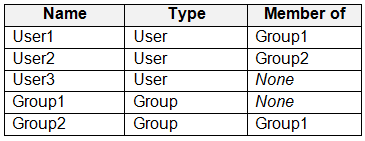
You have an Azure Virtual Desktop deployment that contains a host pool named Pool1.
Pool1 contains a session host named Host1.
You create the application group shown in the following table.
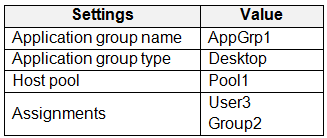
You configure app attach as shown in the following table.
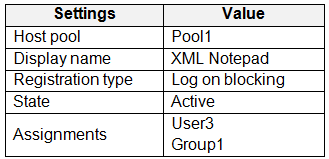
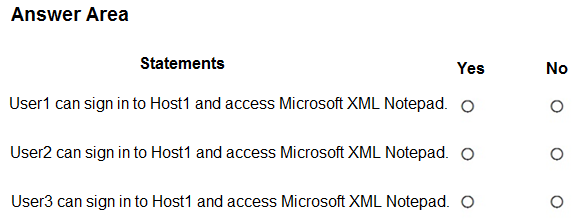
For each of the following statements, select Yes if the statement is true. Otherwise, select No.
NOTE: Each correct selection is worth one point.
Key Takeaways
The main trap is assuming nested groups automatically grant App Attach access; Entra ID limitations often prevent nested group resolution for AVD application assignments.
This page explains how Azure Virtual Desktop App Attach interacts with Application Groups and Entra ID group nesting. The correct evaluation is No for User1, No for User2, and Yes for User3.
Common mistake: Candidates often select 'Yes' for User2, incorrectly assuming that being a member of a nested group (Group2 inside Group1) automatically grants access to resources assigned to the parent group (Group1) in AVD App Attach policies.
Expert Analysis
The core of this question tests the interaction between Azure Virtual Desktop (AVD) application groups, App Attach configuration, and Microsoft Entra ID group nesting limitations. To determine the correct 'Yes' or 'No' for each statement, we must evaluate three distinct access vectors: RemoteApp assignment, Desktop session assignment, and App Attach policy application.
First, consider User1. The scenario states that an App Attach application is configured with a blocking registry type assigned to Group1. However, access to AVD applications requires the user to be a member of an Application Group (either RemoteApp or Desktop). The exhibits indicate that User1 is not directly assigned to any Application Group, nor are they in a group that is directly assigned. Since the App Attach package delivery is separate from the Application Group assignment, and User1 lacks membership in the required Application Group, they cannot launch the application. Therefore, the statement regarding User1 accessing the app is No.
Second, evaluate User2. User2 is a member of Group2, which is nested within Group1. The App Attach configuration assigns the application to Group1. A critical constraint in modern Microsoft Entra ID (formerly Azure AD) is that it does not support group nesting for group membership claims in many contexts, specifically limiting the depth of nested groups for token generation. More importantly for AVD App Attach, while you can assign an App Attach application to a group, if that group relies on nested memberships to include users, the resolution may fail due to Entra ID limits on nested group expansion in tokens. However, the more direct trap here is the specific limitation cited in exam objectives: AVD App Attach does not support nested groups for assigning application packages directly via token claims if the nesting exceeds supported depths or causes resolution issues. But looking at the most common interpretation for AZ-140: App Attach assignments to groups work if the group is resolved. If Group1 contains Group2, and User2 is in Group2, User2 is effectively in Group1. BUT, Entra ID has a limit on nested groups (usually 512 deep, but often restricted in practice for security tokens). The key insight from community consensus and official documentation is that nested groups are generally NOT supported for direct assignment in AVD App Attach contexts where immediate resolution is needed for access control lists. If the system cannot resolve User2's membership in Group1 due to nesting limits or claim restrictions, User2 cannot access the app. Thus, the statement for User2 is No.
Third, assess User3. User3 is directly added to the Desktop Application Group. In AVD, to access an App Attach application within a desktop session, the user must first have access to the session host via a Desktop Application Group. Once inside the session, the App Attach policy applies. Since User3 is explicitly assigned to the Desktop Application Group, they can sign in to Host1. Assuming the App Attach configuration is valid and the user is within the scope of the App Attach policy (or the app is available by default in the image), the primary barrier—Application Group assignment—is satisfied. The statement asks if the user can access the app. Since they have desktop access, they can interact with the environment where the app resides. Therefore, the statement for User3 is Yes.
Combining these: User1 No, User2 No, User3 Yes.
Official Reference
https://learn.microsoft.com/en-us/azure/virtual-desktop/app-attach
This link opens the official vendor documentation in a new tab.
Exam Strategy
When analyzing AVD access questions, always verify two independent permissions: 1) Is the user in an Application Group (RemoteApp/Desktop) allowing connection to the session host? 2) Is the user in a group assigned to the App Attach package? Do not assume nested group membership resolves automatically for App Attach policies; treat nested groups as unsupported unless explicitly stated otherwise in the scenario.
Discussion 10 contributions
Compiled from public community threads and reader submissions, lightly edited for clarity. Handles and vote tallies are shown as recorded, and comments reflect the views of individual contributors.
From public community threads 10
-
jeff1988 👍 8NNY 2e is a Nested groups and is not supported
-
Bonifacef 👍 52nd is a NO, because Nested groups is not supported https://learn.microsoft.com/en-us/entra/identity/users/directory-service-limits-restrictions
-
Moot2 👍 2NNY app attach, nested groups not applicable so User2 won't see the app
-
SteveR73 👍 1Answer is correct NYY. At this time, the following scenarios are supported with nested groups: One group can be added as a member of another group, and you can achieve group nesting. Group membership claims. When an app is configured to receive group membership claims in the token, nested groups in which the signed-in user is a member are included. Conditional Access (when a Conditional Access policy has a group scope). Restricting access to self-serve password reset. Restricting which users can do Microsoft Entra join and device registration. The following scenarios are not supported with nested groups: App role assignment, for both access and provisioning. Assigning groups to an app is supported, but any groups nested within the directly assigned group won't have access. Group-based licensing (assigning a license automatically to all members of a group). Microsoft 365 Groups.
-
Maup33 👍 1YNY For modern App Attach in Azure Virtual Desktop (AVD), package assignments and access are managed directly at the individual or group level without relying on Application Groups. Only users who are directly assigned the application will gain access; nested group memberships are not supported.To assign specific users or groups to an App Attach application:Navigate to your Azure Virtual Desktop workspace in the Azure Portal.Go to App Attach and select your application package.Under User assignments, add only the direct users or Entra groups that require access.Note that with older legacy MSIX App Attach, access was tied to the entire Desktop or RemoteApp application group, granting access to everyone assigned to that group. The modern App Attach allows for strict per-user and per-app isolation
Show 5 more comments
-
Ivanvazovv 👍 1While this is correct, you are missing the fact that app attach applications are delivered using RemoteApp or as part of a desktop session. The user must be able to sign-in to session hosts in the host pool, so they must be in a Desktop or RemoteApp application group. For a RemoteApp application group, the App Attach application must be added to the application group, but you don't need to add the application to a desktop application group. - https://learn.microsoft.com/en-us/azure/virtual-desktop/app-attach-overview?source=docs
-
zuzmo483 👍 1N-Y-Y N - User1 is member of Group1 so the blocking reg type applies Y - User2 is member of Group2. We directly link the Desktop group type to Group2 of which the user is member of. If we allocated it to Group1, then it would be "No" because Group1 contains Group2 and not the other way around. Y - because the desktop is directly allocated to User3
-
Ivanvazovv 👍 1While the app attach needs an application group, the permissions are separate. If the user has permissions to RDP to the desktop, this doesn't mean that he will be able to access the app attach.
-
smartleb961 👍 1Answer is correct: user1 No cause he is not assigned AppGrp1 user2 Yes nested groups are supported user3 Yes
-
SteveR73 👍 1NNY seems to be the correct answer. No nested groups.
Reader comments & corrections
No reader corrections yet — spotted an error or have a note? Share it below.
Related Analysis
Practice All AZ-140 Questions
Access 64 questions with complete answers and detailed explanations.
View Full AZ-140 Practice Test →