Azure Compute Gallery Image Source Requirements
Short answer
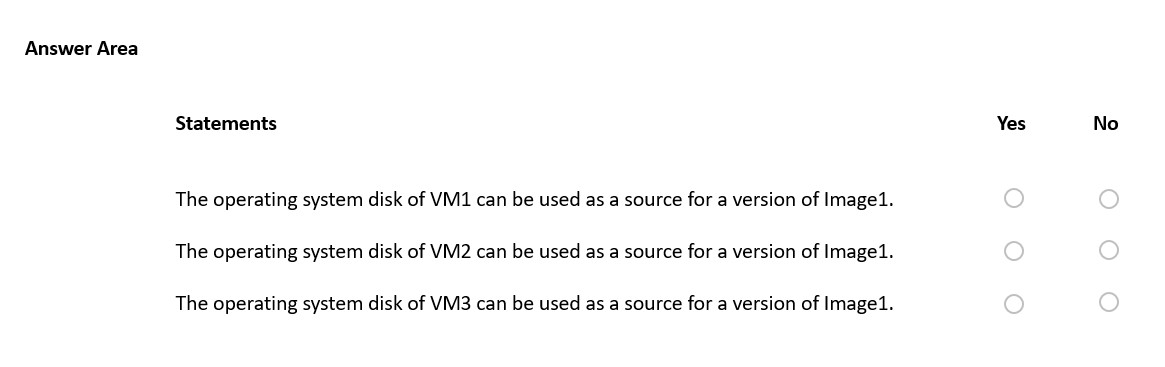
The operating system disks of VM1, VM2, and VM3 can be used as sources for Image1 respectively as No, Yes, and No.
Question
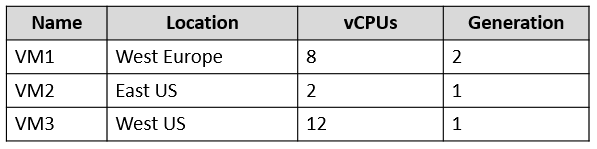
You have an Azure subscription that contains the virtual machines shown in the following table.
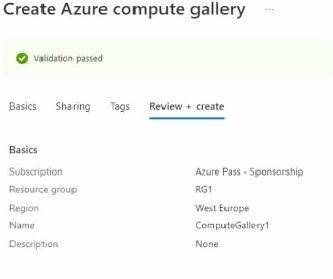
You create an Azure Compute Gallery named ComputeGallery1 as shown in the Azure Compute Gallery exhibit. (Click the Azure Compute Gallery tab.)
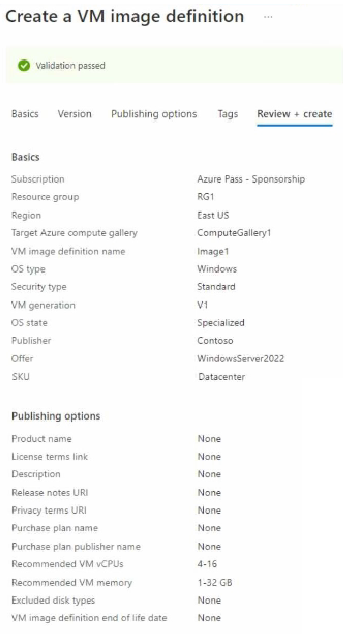
In ComputeGallery1, you create a virtual machine image definition named Image1 as shown in the image definition exhibit. (Click the Image Definition tab.)
For each of the following statements, select Yes if the statement is true. Otherwise, select No,
NOTE: Each correct selection is worth one point.
Key Takeaways
Candidates often overlook that the source VM must match the image definition's region and generation exactly, and its vCPU count must fall strictly within the defined range.
This question tests the eligibility criteria for using an existing VM's OS disk as a source for an Azure Compute Gallery image version, focusing on region, generation, and vCPU constraints.
Common mistake: Learners frequently select 'Yes' for VM1 or VM3 by ignoring the region mismatch or the vCPU range violation, assuming that replication or flexibility applies to the initial source selection.
Expert Analysis
To determine the correct answers, we must evaluate each Virtual Machine (VM) against the three strict requirements for being a source of an Azure Compute Gallery image version: Region, Generation, and vCPU count.
- VM1 (Yes/No?): No. The image definition
Image1is located in East US. VM1 is located in West Europe. While Azure allows replicating images across regions later, the source OS disk must reside in the same region as the image definition at the time of creation. Furthermore, VM1 is Generation 2, whileImage1requires Generation 1. Both constraints fail. - VM2 (Yes/No?): Yes. The image definition
Image1is in East US. VM2 is also in East US. VM2 is Generation 1, matching the image requirement. Its vCPU count is 8, which falls within the defined range of 4–16. All constraints are satisfied. - VM3 (Yes/No?): No. Although VM3 is in East US and is Generation 1, its vCPU count is 2. The image definition specifies a required vCPU range of 4–16. Since 2 is outside this range, VM3 cannot be used as a source.
Official Reference
This link opens the official vendor documentation in a new tab.
Exam Strategy
When evaluating image source eligibility, systematically check three attributes: Region (must match), Generation (must match), and vCPU (must be within range). Eliminate any VM that fails even one criterion immediately to avoid confusion from partial matches.
Frequently Asked Questions
Can I use a VM from a different region as a source?
Does the vCPU count have to be exact?
Discussion 45 contributions
Compiled from public community threads and reader submissions, lightly edited for clarity. Handles and vote tallies are shown as recorded, and comments reflect the views of individual contributors.
From public community threads 30 of 45
-
mmarkiew 👍 62So many people here are making assumptions without actually testing or validating them. The answer is YYY - Tested in Lab. Neither the region, vCPU count, nor the VM generation had any impact on my ability to select a particular VM OS disk as a source for an image version.
-
KMLearn2 👍 19NYY image definition needs V1 generation, but vCPU and memory are only recommendations. Text from Azure Portal while creating image definition: "These recommendations are informational only, and do not constrain VM specification"
-
mmarkiew 👍 12Steps I took via the Azure Portal: - Created a new VM in Central US. Per the Overview blade, VM generation = V2, vCPUs = 1. - Created a new Compute Gallery in West Europe. - Added a new VM image definition to the Compute Gallery exactly as per the definition in the question (East US, VM generation = V1, same recommended CPUs, etc.). When configuring the image version as part of the image VM image definition deployment, I had the option to switch between regions. I selected Central US, and was able to then select the OS disk from the Gen2 VM I created in Central US as the source for the image version. I was then able to successfully deploy the VM image definition along with the version.
-
SgtDumitru 👍 8N-Y-N Box 1- NO: VM gen 2 is not directly supported for image definition with v1. Image & VM source regions doesn't match Box 2 - YES: VM generations matches, along with image & VM source region Box 3 - NO: VM generations matches, but image & VM source region doesn't https://learn.microsoft.com/en-us/azure/virtual-machines/shared-image-galleries?tabs=azure-cli#how-do-i-specify-the-source-region-while-creating-the-image-version
-
Exilic 👍 7Can anyone confirm this answer?
Show 25 more comments
-
Ariel235788 👍 5ChatGPT says No Yes No The operating system disk of VM1 can be used as a source for a version of Image1. No: VM1 is in West Europe, but Image1 is in East US, and the generation (2) is incompatible with Image1's requirement (V1). The operating system disk of VM2 can be used as a source for a version of Image1. Yes: VM2 is in East US, matches the generation requirement (V1), and has sufficient vCPUs (2 falls within the recommended 4-16 range). The operating system disk of VM3 can be used as a source for a version of Image1. No: VM3 is in West US, not East US as required for Image1. Final Answer: No Yes No
-
nightowl159 👍 5NYN. Location does matter so only VM2 fits. The CPU is just a recommendation, not a requirement.
-
profesorklaus 👍 5I agree with you. I did the same and confirm.
-
6Sam7 👍 5What is the correct answer?
-
Amir1909 👍 5No Yes No
-
Anonymous learner 👍 4Check against vCPU and VM Generation ==recommended vCPU (4-16) and Generation 1 1) VM1 = 8 vCPU; Gen 2 = NO because Gen required is 1; 2) VM2 = 2 vCPU; Gen 1 = NO because vCPU lower than recommended (4-16); 3) VM3= 12 vCPU; Gen 1= YES (vCPU between recommended and Gen 1)
-
AliNadheer 👍 4to me at the moment: N,N,Y seems like VM generation and location is important to consider. check this YT link. appreciate your thoughts. https://www.youtube.com/watch?v=AWK1GVXdAwI
-
lahart99 👍 4NNY if you look at VM generation it's set to 1 then you look at amount of CPU allowed is 4-15 Which makes the answer NNY
-
cris_exam 👍 3Tested in my Azure Sub as well. The answer is YYY Neither the region, vCPU count, nor the VM generation had any impact on the selection of a VM OS disk as a source for creating an image version.
-
alsmk2 👍 3NYY 1. V2 VM, whereas the image definition is for V1. V2 could be used if V2 was specified. 2. V1, so all good. Location doesn't matter. 3. V1, so all good. Location doesn't matter.
-
LinuxLewis 👍 3I think: NNY 1. version supported is V1 (VM1 is V2) 2. recommended VM CPU 4-16 (VM2 is 2 CPUs) 3. checks all parameters
-
Learner2022 👍 3Does the location matter?
-
Anonymous learner 👍 3WRONG No Yes No
-
ozansenturk 👍 2Azure Compute Gallery Settings: Gallery: Azure Compute Gallery 1 in West Europe. Image: Image1 in the gallery targeting East US. vCPU Range: 4–16. Generation: Gen1. VM Configurations: VM1: Location: West Europe. vCPU: 8 (in range 4–16, valid). Generation: Gen2 (invalid because the image requires Gen1). Result: Cannot be used as a source. VM2: Location: East US. vCPU: 2 (invalid because it's outside the range 4–16). Generation: Gen1 (valid for the image's generation requirement). Result: Cannot be used as a source. VM3: Location: West US. vCPU: 12 (in range 4–16, valid). Generation: Gen1 (valid for the image's generation requirement). Result: Can be used as a source.
-
conip 👍 2for 3) I love that description about region limitation: "In Region, select the region where you want the image created. In some cases, the source must be in the same region where the image is created. If you aren't seeing your source listed in later drop-downs, try changing the region for the image. You can always replicate the image to other regions later." https://learn.microsoft.com/en-us/azure/virtual-machines/image-version?tabs=portal%2Ccli2 so Y or N ?
-
Infraestructura 👍 2No, Probado en laboratorio. 1) NO. Error: "/resourceGroups/RG1/providers/Microsoft.Compute/disks/VM1_OsDisk_1_24b307644e4c4feb92f0489a552bed02' has security type 'TrustedLaunch' and cannot be used as a source for an image definition with SecurityType feature set to 'None'. 2) Sí. 3) Sí
-
d6f865d 👍 2Correct. You can convert from gen2 to gen1. You can not convert from gen1 to gen2
-
LovelyGroovey 👍 2So, what is the logic here? Can you explain to us?
-
alsmk2 👍 2vCPU count = recommended, not a hard requirement.
-
Josh219 👍 2explain the logic why all are YES
-
AliNadheer 👍 2i meant to say the answer N,Y,N
-
MasterMans 👍 2Should be Y,N,N.
-
Mitko_V_Milkov 👍 1After intensive interrogation of ChatGPT I came up with the following conclusions (Please know ChatGPT will not give you the correct answer if you just copy the data to it): There are couple of things that matter here – generation and location. The CPU/memory match is only recommended and if you do not comply Azure may issue a warning or you may observe abnormal behaviour. However, generation and location matters when working with Azure Compute Galleries, virtual machines (VMs), and image definitions. As the “Gallery” is in a separate location from the image, the location of the VM must match the “Image Definition” (East US). So the answers are: VM1 is in different location and generation 2 – NO VM2 is in the same location as the Image Definition and generation 1 – Yes VM3 is generation 1, but the location does not match - NO
-
adilkhan 👍 1chatgPT4: Statement 1: The operating system disk of VM1 can be used as a source for a version of Image1. VM1 has Generation 2, whereas Image1 requires Generation 1. Therefore, VM1 cannot be used. Statement 2: The operating system disk of VM2 can be used as a source for a version of Image1. VM2 is in the same region (East US) as the image definition and has Generation 1. Therefore, VM2 can be used. Statement 3: The operating system disk of VM3 can be used as a source for a version of Image1. VM3 has Generation 1, but it's located in West US, different from the image definition region (East US). Therefore, VM3 cannot be used.
-
[email protected] 👍 1The operating system disk of VM1 can be used as a source for a version of Image1.No The operating system disk of VM2 can be used as a source for a version of Image1.Yes The operating system disk of VM3 can be used as a source for a version of Image1.Yes Rules For an Azure Compute Gallery image version: The source OS disk must match the VM generation of the image definition. The source VM can be in a different region from the gallery. A Generation 1 image definition requires a Generation 1 source disk.
Reader comments & corrections
No reader corrections yet — spotted an error or have a note? Share it below.
Related Analysis
Practice All AZ-104 Questions
Access 100 questions with complete answers and detailed explanations.
View Full AZ-104 Practice Test →