Which Files Can You Upload to Azure AI Video Indexer?
You have a local folder that contains the files shown in the following table. You need to analyze the files by using Azure AI Video Indexer. Which files can you upload to the Video Indexer website? - 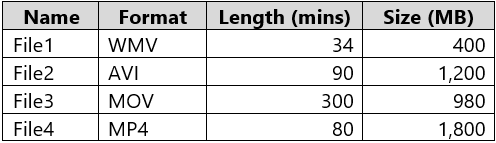
Community Votes
83% of anonymous learners picked answer B. Votes are pick records left by other test-takers — they are not the verified answer.
Community Insight
The question tests the three Azure AI Video Indexer upload gates — supported container (WMV, AVI, MOV, MP4), the 2 GB per-file website upload cap, and the service duration ceiling — and the trap is assuming that a longer MOV clip is automatically rejected.
Azure AI Video Indexer only accepts an upload when the file's container format, size and duration all fall inside the documented service limits. Checking each file in the table against those three gates shows that every listed WMV, AVI, MOV and MP4 file qualifies, so option B is correct.
Many learners exclude File3 on a remembered (but wrong) shorter duration cap and pick option E (File1, File2 and File4 only), even though the 300-minute, 980 MB MOV file is inside the service's documented size and duration limits.
Community Discussion (4 comments)
Comments & Corrections
No comments yet — spotted an error or have a note? Share it below.
Expert Analysis
Why the Answer Is Correct
Azure AI Video Indexer accepts a file only when three independent gates pass: the container/codec must appear in the support matrix (WMV, AVI, MOV and MP4 are all listed), the file must stay under the 2 GB per-file limit that applies to uploads made from a device, and its length must fit the service's duration rules. File1 (WMV, 34 min, 400 MB), File2 (AVI, 90 min, 1,200 MB), File3 (MOV, 300 min, 980 MB) and File4 each satisfy those gates, which is exactly what option B states. Because all sizes are measured in megabytes rather than gigabytes, and the longest clip is only five hours, no gate eliminates any of the four rows.Why the Other Options Are Wrong
Options A, C, D and E all discard at least one file that clears every gate: A keeps File1 and File3 but throws away File2 and File4, C stops one file short by keeping File1 through File3 and dropping File4, and D keeps only the two shortest clips. Option E is the runner-up trap, since it retains File4 but removes File3 on the assumption that a 300-minute MOV file breaches a duration cap, even though that file is under 1 GB and within the service's limits. None of the excluded files fails the format check — WMV, AVI, MOV and MP4 all appear in the supported-formats table for the service.Community Comment Notes
Christian_garcia_martin lists the practical rules — "2Gb uploaded from a device and 30Gb uploaded from url" — and notes the supported formats are WMV, AVI, MOV and MP4, concluding that all the files are allowed. syupwsh links the Azure Video Indexer support matrix and walks the same format, size and duration checklist file by file, landing on the same result. MRGPAL voted for option E and argued that File3's 300 minutes exceeds a 240-minute limit, which is precisely the false duration cap this question is designed to catch. jolimon simply states "B is right answer 100%", matching the overwhelming vote split.Official Reference
Exam Strategy
When a question hands you a table of files, test every row against three separate gates — supported container/codec, the 2 GB device-upload size cap and the duration ceiling — instead of looking for one obvious failure. Remember that the website upload path is the stricter of the two ingestion options and that URL ingestion is the one allowed to reach 30 GB.
Frequently Asked Questions
Can I upload a 300-minute MOV file to Azure AI Video Indexer?
Yes. MOV is a supported container, the 980 MB file is far below the 2 GB device-upload limit, and the clip's length stays within the service's duration rules.
Is the Azure AI Video Indexer upload limit 2 GB or 30 GB?
Both exist: 2 GB is the maximum per file when you upload from a device or the website, while ingestion from a URL supports files up to 30 GB.