How Do You Wait for Azure AI Vision OCR Read Completion?
Short answer
BD Verify read_results.status and wrap get_read_result in a delayed retry loop so the Azure AI Vision OCR read operation completes before results are retrieved.
Question
Key Takeaways
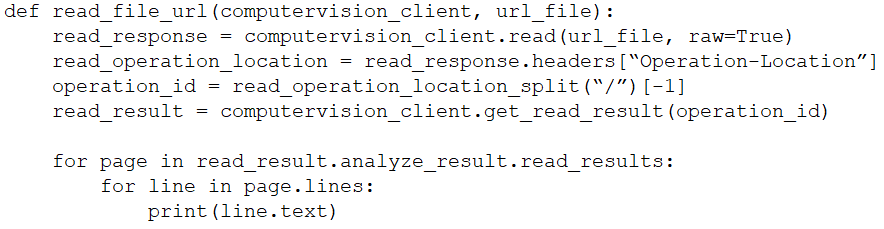
This question tests asynchronous polling in the Azure AI Vision Read API; the trap is treating read_operation_location as a status or removing the required operation_id.
Azure AI Vision OCR uses an asynchronous read operation, so get_read_result can be called before results are ready. This page explains why checking read_results.status and wrapping the call in a delayed loop (B, D) is the correct fix.
Common mistake: A common wrong choice is C, verifying the status of read_operation_location, because learners confuse the operation-location URL with the actual read status field that must be checked.
Expert Analysis
Why the Answer Is Correct
The Azure AI Vision Read API is asynchronous: your initial read call returns an operation_id and a read operation location, and OCR results are not available immediately. To prevent get_read_result from running too early, you must poll the operation state. Option B is correct because checking read_results.status lets your code detect states such as running and wait for succeeded before using the results. Option D is correct because a loop with a delay avoids hammering the service and keeps checking until the operation completes. Together, B and D implement the standard polling pattern and ensure get_read_result is only called once the read operation has finished.
Why the Other Options Are Wrong
Option A is wrong because operation_id is not optional: it identifies the specific read operation whose result you need, and removing it would prevent get_read_result from retrieving the correct OCR output. Option C is wrong because read_operation_location is a URL/endpoint used for polling, not a status field; verifying its status is not a meaningful check and does not tell you whether OCR is complete. Although a delay alone might reduce the chance of an early call, option D by itself is insufficient because the code still needs to confirm success via read_results.status. Therefore only the combination of B and D properly gates the get_read_result call.
Community Comment Notes
Learners overwhelmingly converged on B and D; as anto69 noted, the combination is "repeated many times with both python an C#". TsuenKit gave a detailed rationale, explaining that read_results.status returns values such as "notStarted", "running", or "succeeded", so the code can avoid accessing results too early. moonlightc and mrg998 simply confirmed B and D, which aligns with the polling pattern. The consensus is consistent with the SDK behavior: status check plus delay loop is the required fix.
Official Reference
- https://learn.microsoft.com/en-us/azure/ai-services/computer-vision/overview-ocr
- https://learn.microsoft.com/en-us/azure/ai-services/computer-vision/how-to/call-read-api
These links open the official vendor documentation in a new tab.
Exam Strategy
For multi-select OCR questions, identify the asynchronous operation and its status field first; the answer usually pairs status verification with a retry/delay loop. Eliminate options that remove required identifiers like operation_id or treat the operation-location URL as a status.
Frequently Asked Questions
Why is removing operation_id not a valid fix for premature Azure AI Vision OCR calls?
Why check read_results.status instead of read_operation_location in Azure AI Vision?
Community Votes
100% of anonymous learners picked answer BD. Votes are pick records left by other test-takers — they are not the verified answer.
Discussion 4 contributions
Compiled from public community threads and reader submissions, lightly edited for clarity. Handles and vote tallies are shown as recorded, and comments reflect the views of individual contributors.
From public community threads 4
-
anto69 👍 6B - D, repeated many times with both python an C#
-
TsuenKit 👍 1The answer is B and D. Explanation -B. Add code to verify the read_results.status value. We need to check this status to ensure that the operation is complete before retrieving the results. Adding code to check the read_results.status value provides the status of the OCR operation (e.g., "notStarted", "running", or "succeeded"), so we avoid to access results before they are available. D. Wrap the call to get_read_result within a loop that contains a delay. The OCR process in Azure AI Vision is asynchronous, so wrapping the call to get_read_result in a loop with a delay allows you to continuously check whether the operation is complete.
-
moonlightc 👍 2B and D
-
mrg998 👍 1B & D for sure
Reader comments & corrections
No reader corrections yet — spotted an error or have a note? Share it below.