Which Files Can Upload to Document Intelligence Studio
Short answer
E Upload File1 and File2 only because they are under the 500 MB limit and not password-protected.
Question
Key Takeaways
Document Intelligence limits file uploads to 500 MB and rejects password-protected PDFs, making only non-encrypted, under-limit files valid.
Azure AI Document Intelligence custom extraction models have specific file size and format requirements. This page establishes that only non-locked, properly-sized supported files like JPG and PDF can be used for training.
Common mistake: Choosing options that include XLSX or PNG files over 500 MB, or assuming password-protected PDFs can be processed by the service.
Expert Analysis
Why the Answer Is Correct
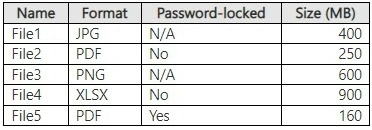
Option E is correct because File1 (JPG, 400 MB) and File2 (PDF, 250 MB, not password-locked) both meet the Azure AI Document Intelligence file size limit of 500 MB and the format requirements for training a custom extraction model. Neither file is encrypted, allowing the service to access the raw content for processing and model training.
Why the Other Options Are Wrong
Options A, B, C, and D are incorrect because they include files that violate the service limits or security constraints. File3 (PNG, 600 MB) and File4 (XLSX, 600 MB) exceed the 500 MB maximum file size limit for the S0 tier. File5 (PDF, 250 MB, password-locked) is invalid because the service cannot process password-protected or encrypted PDFs to extract text and structures.
Community Comment Notes
Commenters correctly point out that the S0 tier supports files up to 500 MB, which immediately disqualifies File3 and File4. As one user noted, "Encryption prevents the service from accessing the necessary data for processing", which eliminates File5. This leaves only File1 and File2 as valid training data.
Official Reference
This link opens the official vendor documentation in a new tab.
Exam Strategy
Check both the file format and the file size against the 500 MB limit for the S0 tier. Also, always eliminate any files that are password-protected or encrypted, as Document Intelligence requires access to raw content.
Community Votes
100% of anonymous learners picked answer E. Votes are pick records left by other test-takers — they are not the verified answer.
Discussion 4 contributions
Compiled from public community threads and reader submissions, lightly edited for clarity. Handles and vote tallies are shown as recorded, and comments reflect the views of individual contributors.
From public community threads 4
-
a8da4af 👍 10 Answered EGiven the updated information that the S0 tier now supports files up to 500 MB, let’s re-evaluate each file's compatibility with Azure AI Document Intelligence: File1 (JPG, 400MB) - Supported format and within the 500MB limit (supported). File2 (PDF, 250MB) - Supported format and within the 500MB limit (supported). File3 (PNG, 600MB) - Supported format but exceeds the 500MB limit (not supported). File4 (XLSX, 900MB) - Unsupported format (not supported). File5 (PDF, 160MB, password-locked) - Password-protected, which is not supported (not supported). Given this, the files that can be uploaded are: File1 (JPG, 400MB) File2 (PDF, 250MB) Correct answer: E. File1 and File2 only
-
syupwsh 👍 1 Answered EAzure AI Document Intelligence in the S0 tier supports JPG, PNG, PDF, and Excel (XLSX) files. However, password-locked PDFs cannot be processed unless unlocked, which excludes File5. The max file size for anayzing supported documents is 500 MB so File3 and File4 are excluded. File1 (JPG, 400 MB) is supported and under the size limit. File2 (PDF, 250 MB, not password-locked) is supported and under the size limit. Answer is E
-
chrillelundmark 👍 1 Answered Ehttps://learn.microsoft.com/en-us/azure/ai-services/document-intelligence/service-limits?view=doc-intel-4.0.0 Azure AI Document Intelligence operates on the raw content of the PDF to extract text, tables, and other elements. Encryption prevents the service from accessing the necessary data for processing.
-
e41f7aa 👍 3 Answered EFile1 and File2 only
Reader comments & corrections
No reader corrections yet — spotted an error or have a note? Share it below.