Selecting Prebuilt AI Capabilities in Microsoft Foundry Tools
Short answer
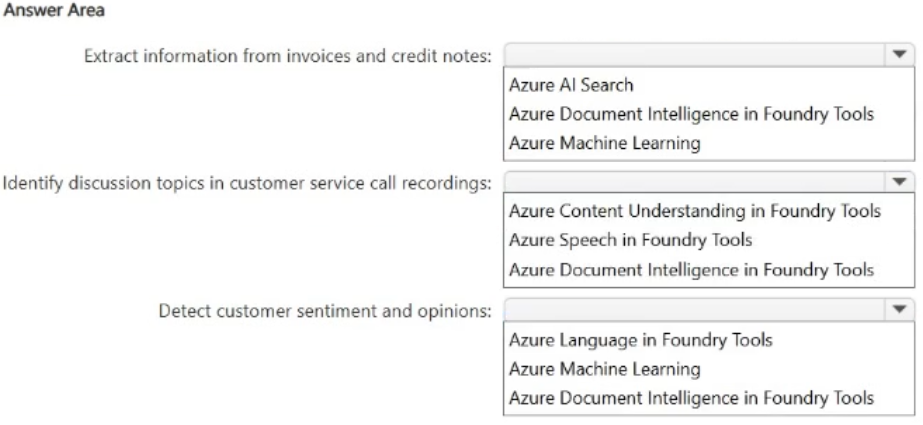
1. Azure Document Intelligence in Foundry Tools; 2. Azure Content Understanding in Foundry Tools; 3. Azure Language in Foundry Tools
Question
You need to recommend an AI solution for each task. The solutions must use prebuilt AI capabilities to reduce development time.
What should you recommend for each task? To answer, select the appropriate options in the answer area.
NOTE: Each correct selection is worth one point.
Key Takeaways
The main trap is confusing Azure Speech with Azure Content Understanding; Speech transcribes audio but Content Understanding analyzes it for topics and sentiment.
This page explains how to select the correct Foundry Tool for document extraction, audio topic analysis, and text processing. The correct answers are Azure Document Intelligence, Azure Content Understanding, and Azure Language respectively.
Common mistake: Learners often select Azure Speech for call analysis because they focus only on transcription. However, the requirement to 'identify topics' requires the semantic analysis capabilities provided by Azure Content Understanding, which goes beyond simple speech-to-text conversion.
Expert Analysis
The scenario requires selecting prebuilt AI capabilities from Microsoft Foundry Tools to reduce development time for three specific tasks. The key constraint is using services that handle structured extraction, audio analysis, and text processing without custom model training.
First, the task involves extracting data from forms, invoices, receipts, and PDFs. This is a classic document understanding problem. Azure Document Intelligence (formerly Form Recognizer) is the specialized Foundry Tool designed for this exact purpose, offering prebuilt models for layout, key-value pairs, and general documents. It accurately identifies and extracts structured information from unstructured documents.
Second, the task involves analyzing recorded calls to identify topics. While Azure Speech can transcribe audio to text, it does not inherently analyze semantic topics or sentiment on its own. Azure Content Understanding in Foundry Tools provides audio analyzers that go beyond transcription to extract higher-level insights such as key topics, summaries, sentiment, and speaker roles directly from audio files. This makes it the superior choice for topic identification compared to basic speech-to-text services.
Third, the task likely involves natural language processing such as sentiment analysis, language detection, or key phrase extraction from text. Azure Language in Foundry Tools offers prebuilt NLP capabilities including text analytics for sentiment, language detection, and entity recognition. It is the appropriate tool for processing textual data to derive meaning.
The distinction between these tools lies in their input modality and output granularity: Document Intelligence handles structured data extraction from visual documents; Content Understanding handles semantic analysis of audio; and Azure Language handles semantic analysis of text.
Official Reference
- https://learn.microsoft.com/en-us/azure/ai-services/document-intelligence/overview
- https://learn.microsoft.com/en-us/azure/ai-services/content-understanding/overview
These links open the official vendor documentation in a new tab.
Exam Strategy
When evaluating prebuilt AI services, always distinguish between the input format (document, audio, text) and the desired output granularity (raw data vs. semantic insight). For audio, remember that 'transcription' points to Speech, while 'topics/sentiment/summary' points to Content Understanding. For documents, look for 'extraction' or 'forms'. For text, look for 'language' or 'sentiment'.
Frequently Asked Questions
What is the difference between Azure Speech and Azure Content Understanding?
Why use Azure Document Intelligence instead of OCR?
Discussion 3 contributions
Compiled from public community threads and reader submissions, lightly edited for clarity. Handles and vote tallies are shown as recorded, and comments reflect the views of individual contributors.
From public community threads 3
-
omath 👍 3➡️ Azure Document Intelligence in Foundry Tools Because this task involves structured extraction from forms, invoices, receipts, and PDFs — exactly what Document Intelligence is built for. ➡️ Azure Speech in Foundry Tools Speech → transcribe audio → produce text → identify topics. The prebuilt capability that handles call recordings is Speech, not Content Understanding. ➡️ Azure Language in Foundry Tools Sentiment analysis is a core NLP task, handled by the Language service.
-
ea4c337 👍 21) Azure Document Intelligence in Foundry tool 2) Azure Content Understanding in Foundry Tool because it analyzes audio recordings and extracts higher-level insights such as topics, summaries, sentiment, speaker roles, and structured fields 3) Azure Language in Foundry tool
-
M2000F007fubar 👍 1for #2 correct answer is: Azure Content Understanding in Foundry Tools --- Use Azure Content Understanding in Foundry Tools to identify and understand topics in recorded calls. Its audio analyzers can extract key topics, summaries, sentiment, and call categories—not just a transcript.
Reader comments & corrections
No reader corrections yet — spotted an error or have a note? Share it below.