Matching Business Scenarios to Microsoft AI Solutions
Short answer
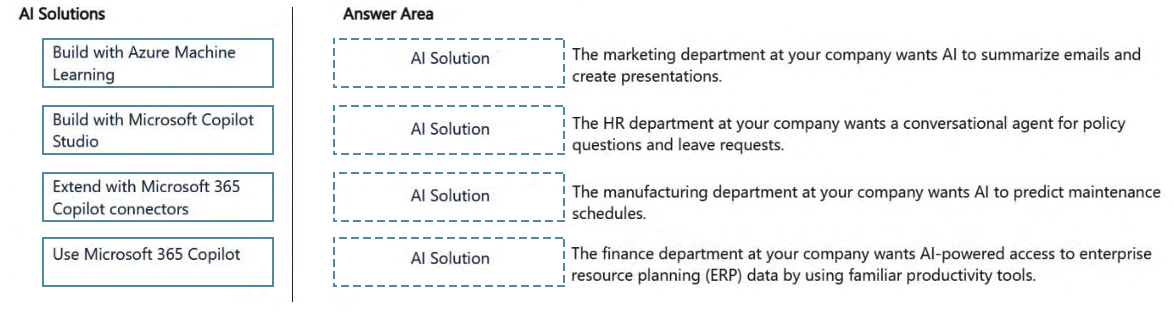
Summarize emails and create presentations maps to Use Microsoft 365 Copilot; HR conversational agent maps to Build with Microsoft Copilot Studio; Predict maintenance schedules maps to Build with Azure Machine Learning; and AI access to ERP data in M365 apps maps to Extend with Microsoft 365 Copilot connectors.
Question
Match the business scenario to the appropriate AI solution design approach.
To answer, drag the AI solution from the column on the left to its business scenario on the right. Each solution may be used once, more than once, or not at all.
NOTE: Each correct match is worth one point.
Key Takeaways
The main trap is misidentifying whether a scenario requires a native productivity assistant (M365 Copilot), a custom conversational agent (Copilot Studio), a predictive ML model (Azure ML), or a data integration layer (Connectors).
Learn how to match business scenarios like email summarization, HR chatbots, predictive maintenance, and ERP data access to the correct Microsoft AI solutions including M365 Copilot, Copilot Studio, Azure ML, and Connectors.
Common mistake: Candidates often incorrectly assign 'Build with Microsoft Copilot Studio' to all custom-looking scenarios, failing to recognize that predictive maintenance requires Azure Machine Learning and that accessing external ERP data for use in M365 apps requires Connectors rather than a standalone bot.
Expert Analysis
This question tests the ability to map specific business scenarios to the correct Microsoft AI solution design approach, distinguishing between out-of-the-box productivity tools, custom conversational agents, predictive machine learning, and data integration connectors.
Marketing Scenario: Summarize emails and create presentations. The correct match is Use Microsoft 365 Copilot. This scenario involves standard productivity tasks within existing M365 apps (Word, Outlook, PowerPoint). M365 Copilot is designed specifically to augment these workflows without requiring custom development. Comments highlighting "productivity inside Word, Outlook..." correctly identify this as a native use case for the integrated assistant.
HR Scenario: Conversational agent for policy questions and leave requests. The correct match is Build with Microsoft Copilot Studio. When an organization needs a dedicated conversational interface that interacts with users across channels or integrates with specific HR systems for transactions (like leave requests), Copilot Studio is the appropriate low-code/no-code platform for building that custom agent. It goes beyond simple text generation to handle multi-turn conversations and actions.
Manufacturing Scenario: Predict maintenance schedules. The correct match is Build with Azure Machine Learning. Predictive maintenance requires analyzing historical sensor data to forecast future failures. This is a classic machine learning problem involving training models on structured data, which is handled by Azure ML, not by generative AI assistants or simple connectors. Comments noting "predictive maintenance = machine learning models" accurately reflect this technical distinction.
Finance Scenario: AI access to ERP data in M365 apps. The correct match is Extend with Microsoft 365 Copilot connectors. If the goal is to bring external enterprise resource planning (ERP) data into the M365 ecosystem so that Copilot can reference it during productivity tasks, the mechanism is via Connectors. This allows the generative AI to retrieve real-time data from sources like SAP or Dynamics 365 without moving the data into the model itself.
The key trap here is confusing "building a custom app" with "extending existing apps." Using Copilot Studio for all custom needs ignores the simpler connector option for data access, while using M365 Copilot for predictive analytics ignores the need for specialized ML models.
Official Reference
- https://learn.microsoft.com/en-us/training/modules/get-started-with-microsoft-copilot-studio/
- https://learn.microsoft.com/en-us/training/modules/use-copilot-connectors/
- https://learn.microsoft.com/en-us/training/modules/plan-for-responsible-ai/
These links open the official vendor documentation in a new tab.
Exam Strategy
When facing drag-and-drop matching questions on Microsoft AI services, first categorize the scenario's primary action: Is it enhancing existing document/app workflows? Is it a conversation? Is it prediction/analysis? Or is it data retrieval? Map 'enhancing workflows' to M365 Copilot, 'conversations' to Copilot Studio, 'prediction/analysis' to Azure ML, and 'data retrieval/integration' to Connectors. This systematic filtering prevents confusion between similar-sounding options.
Frequently Asked Questions
When should I choose Azure Machine Learning over Copilot Studio?
What is the difference between M365 Copilot and extending with Connectors?
Discussion 6 contributions
Compiled from public community threads and reader submissions, lightly edited for clarity. Handles and vote tallies are shown as recorded, and comments reflect the views of individual contributors.
From public community threads 6
-
d1d6163 👍 18Marketing: AI to summarize emails and create presentations = Use Microsoft 365 Copilot HR: Conversational agent for policy questions and leave requests = Build with Microsoft Copilot Studio
-
omath 👍 81. ➡️ Use Microsoft 365 Copilot Because this is productivity inside Word, Outlook, PowerPoint, and Teams. This is the classic “use Copilot where employees already work” scenario. 2. ➡️ Build with Microsoft Copilot Studio This is a custom conversational agent scenario—perfect fit for Copilot Studio. 3. ➡️ Build with Azure Machine Learning Predictive maintenance = machine learning models, not Copilot or connectors. 4. ➡️ Extend with Microsoft 365 Copilot connectors Connectors bring external LOB/ERP data into Microsoft Graph so Copilot can use it.
-
rveney 👍 3Business ScenarioAI SolutionSummarize emails and create presentations Use Microsoft 365 Copilot HR conversational agent Build with Microsoft Copilot Studio Predict maintenance schedules Build with Azure Machine Learning AI access to ERP data in M365 apps Extend with Microsoft 365 Copilot connectors
-
fa62dd5 👍 2Microsoft 365 Copilot: 1 Microsoft Copilot Studio:2 Build with Azure Machine Learning: 3 Extend with Microsoft 365 Copilot connectors:4
-
satoshi_ 👍 11.The marketing department wants AI to summarize emails and create presentations. >Use Microsoft 365 Copilot 2.The HR department wants a conversational agent for policy questions and leave requests. > Build with Microsoft Copilot Studio 3.The manufacturing department wants AI to predict maintenance schedules. > Build with Azure Machine Learning 4.The finance department wants AI-powered access to ERP data by using familiar productivity tools. > Extend with Microsoft 365 Copilot connectors
Show 1 more comment
-
fe59431 👍 11. ➡️ Use Microsoft 365 Copilot Because this is productivity inside Word, Outlook, PowerPoint, and Teams. This is the classic “use Copilot where employees already work” scenario.
Reader comments & corrections
No reader corrections yet — spotted an error or have a note? Share it below.