Configuring Microsoft 365 Tenant Notifications for Groups
Short answer
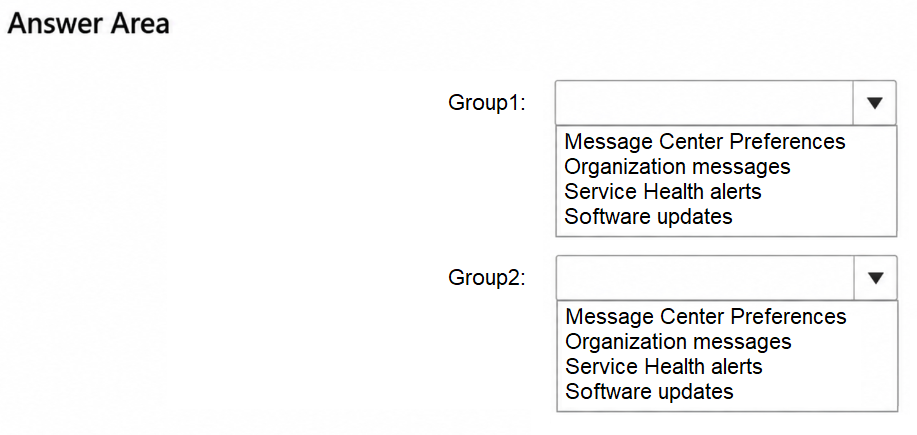
Group1: Message Center Preferences; Group2: Service Health alerts
Question
You have a Microsoft 365 subscription that contains two groups named Group1 and Group2.
You need to configure tenant notifications to meet the following requirements.
Group1: Receive email notifications when major service updates occur.
Group2: Receive email alerts when Microsoft 365 maintenance event occur.
Which type of notification should you configure for each group?
Key Takeaways
The main trap is confusing proactive update communications (Message Center) with reactive incident/maintenance monitoring (Service Health); correct configuration depends on whether the trigger is a planned change or an active status event.
Learn how to configure tenant notifications in Microsoft 365 by assigning Message Center Preferences for major updates and Service Health alerts for maintenance events to specific groups.
Common mistake: Learners often incorrectly assign 'Service Health alerts' to Group1 because they associate 'updates' with 'health', failing to recognize that major service updates are strictly managed through Message Center Preferences.
Expert Analysis
The question requires mapping specific notification types in Microsoft 365 to two distinct groups based on their trigger conditions. The core distinction lies between proactive communication about planned changes and reactive alerts for active incidents.
Group1: Message Center Preferences The requirement for Group1 is to receive notifications when "major service updates occur." In the Microsoft 365 ecosystem, major service updates, product announcements, and planned tenant changes are communicated via the Message Center. Administrators configure who receives these messages using Message Center Preferences, which allow filtering by severity (Major vs. Important) and audience. Therefore, Group1 must be configured with Message Center Preferences to ensure they receive emails regarding major updates.
Group2: Service Health Alerts The requirement for Group2 is to receive email alerts when a "Microsoft 365 maintenance event occurs." Maintenance events typically refer to scheduled downtime or active service degradations/incidents. These are monitored and reported through the Service Health dashboard in the Microsoft 365 admin center. To receive email notifications for these events, administrators must enable Service Health alerts and specify the recipients. Thus, Group2 should be configured with Service Health alerts.
Operational Consequence Confusing these two settings leads to information overload or missed critical issues. Using Message Center for active outages would fail because it only covers planned updates, not real-time health status. Conversely, using Service Health for feature updates would clutter users' inboxes with operational noise instead of strategic change communications. Understanding this separation is vital for effective tenant governance.
Exam Strategy
When configuring tenant notifications, always classify the trigger source first. If the trigger is a planned update, announcement, or change request, use Message Center. If the trigger is an active incident, degradation, or scheduled maintenance window, use Service Health alerts. This binary classification prevents misconfiguration of recipient lists.
Frequently Asked Questions
What is the difference between Message Center and Service Health?
Can I send Message Center notifications to all users automatically?
Discussion 1 contributions
Compiled from public community threads and reader submissions, lightly edited for clarity. Handles and vote tallies are shown as recorded, and comments reflect the views of individual contributors.
From public community threads 1
-
linux_admin 👍 1Group 1: Message Center Preferences Group 2: Service Health alerts Explanation: Message Center Preferences are used to manage notification settings for major feature updates, product announcements, and planned tenant changes. Service Health alerts trigger email notifications for active service incidents, status degradations, and scheduled maintenance events.
Reader comments & corrections
No reader corrections yet — spotted an error or have a note? Share it below.