Configuring Least Privilege and Role Assignment Delegation
Short answer
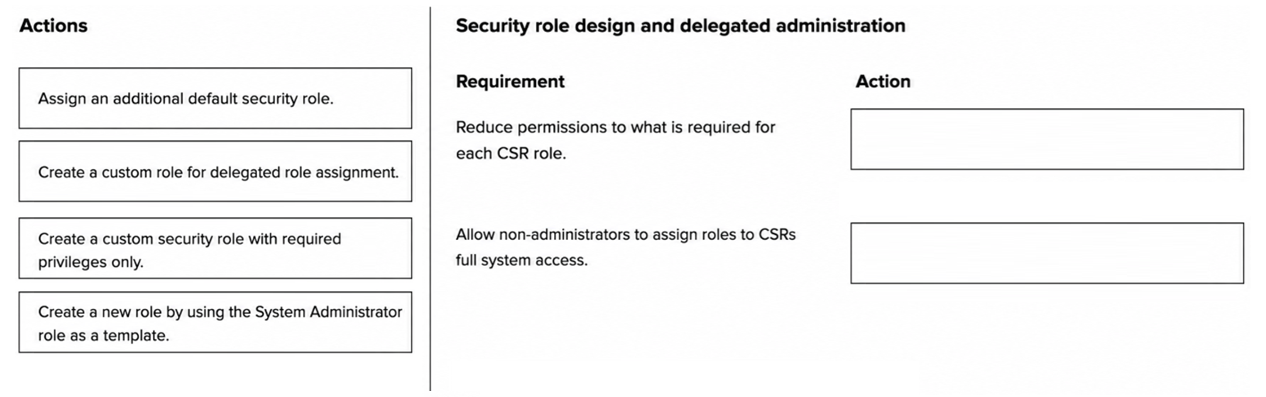
For reducing permissions, configure the security role's privileges. For allowing non-admins to assign roles, assign the Customizer role to those users.
Question
A company uses security roles to ensure that its customer service representatives (CSRs) have access only to the features and data required to perform their duties.
However, default roles currently grant excessive permissions to CSRs.
The company requires that access be limited as follows:
Reduce permissions to just the features and data that are required for each CSR role.
Allow non-administrators to assign roles to CSRs without full system access.
You need to configure the minimal security access for each requirement.
Which action should you perform first for each requirement? To answer, move the appropriate actions to the correct requirements. You may use each action once, more than once, or not at all. You may need to move the split bar between panes or scroll to view content.
NOTE: Each correct selection is worth one point.
Key Takeaways
The question tests the distinction between modifying role contents (privileges) and delegating administrative authority (Customizer role), avoiding the trap of granting full System Administrator rights.
Learn how to configure minimal security access in Dynamics 365 Contact Center by adjusting role privileges and delegating role management via the Customizer role.
Common mistake: Candidates often mistakenly assign the System Administrator role to non-admin users to enable role assignment, which violates the security constraint of limiting access to only necessary features.
Expert Analysis
The scenario requires configuring security in Dynamics 365 Contact Center to adhere to the principle of least privilege while delegating administrative tasks. The first requirement is to reduce permissions for Customer Service Representatives (CSRs) to only necessary features and data. In Dynamics 365, security roles are composed of privileges. To minimize access, you must configure the specific security role by editing its privileges to include only the required entities and operations. This directly addresses the 'excessive permissions' issue by tightening the role definition.
The second requirement is to allow non-administrators to assign roles to CSRs without granting them full system administrator access. Full system administration is a distinct, high-level privilege that should not be granted lightly. Instead, Dynamics 365 provides a specialized security role called Customizer. The Customizer role allows users to edit security roles, create new roles, and assign these roles to other users, but it does not grant them the ability to perform system-wide administrative tasks like managing licenses or global settings. Therefore, assigning the Customizer role to the designated non-admin staff enables them to manage CSR access as required.
To map the actions correctly: For the first requirement (reducing permissions), the action is to configure the security role's privileges. For the second requirement (allowing role assignment without admin rights), the action is to assign the Customizer role to the non-administrator users. These two actions are distinct and address the specific constraints of the scenario using standard Dynamics 365 security mechanisms.
Exam Strategy
When asked to limit user access while enabling specific management tasks, always look for the most granular role available rather than defaulting to 'System Administrator'. Identify if the task involves modifying data/permissions (edit role privileges) versus managing structure/users (assign Customizer role).
Frequently Asked Questions
What is the difference between the Customizer and System Administrator roles?
How do I restrict a CSR's access to specific data?
Discussion 1 contributions
Compiled from public community threads and reader submissions, lightly edited for clarity. Handles and vote tallies are shown as recorded, and comments reflect the views of individual contributors.
From public community threads 1
-
denzelscot7 👍 1TELEGRAM: DRMIKE100 TO BUY ADDERALL IR AND XR IN USA WITHOUT SCRIPT
Reader comments & corrections
No reader corrections yet — spotted an error or have a note? Share it below.
Related Analysis
Practice All AB-250 Questions
Access 106 questions with complete answers and detailed explanations.
View Full AB-250 Practice Test →