Monitoring Copilot Studio Agent Telemetry, Transcripts, and Performance
Short answer
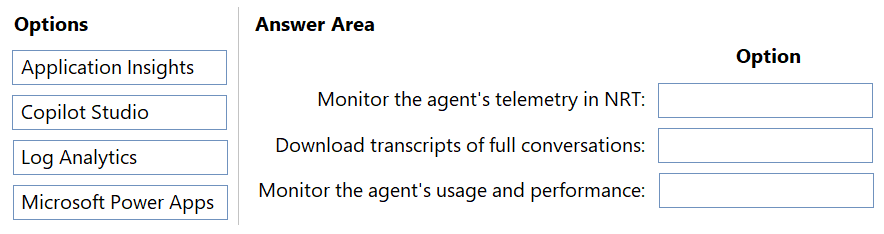
Monitor the agent's telemetry in near-real-time using Application Insights. Download transcripts of full conversations and monitor the agent's usage and performance using the built-in analytics in Microsoft Copilot Studio.
Question
A company has an AI solution that uses a Microsoft Copilot Studio agent.
You need to monitor the agent's performance. The solution must meet the following requirements:
Monitor the agent's telemetry in near-real-time (NRT).
Download transcripts of full conversations.
Monitor the agent's usage and performance.
What should you use for each requirement? To answer, drag the appropriate options to the correct requirements. Each option may be used once, more than once, or not at all. You may need to drag the split bar between panes or scroll to view content.
NOTE: Each correct selection is worth one point.
Key Takeaways
This question tests the distinction between configuring Application Insights for deep NRT diagnostics versus using the built-in Copilot Studio Analytics dashboard for transcripts and out-of-the-box KPIs.
Microsoft Copilot Studio uses Application Insights for near-real-time telemetry, while its native analytics pane handles both full conversation transcript downloads and usage and performance monitoring.
Common mistake: A common mistake is selecting Log Analytics for NRT telemetry instead of Application Insights, or overcomplicating transcript retrieval by using the Power Apps portal instead of the native Copilot Studio download sessions feature.
Expert Analysis
Near-real-time telemetry: Copilot Studio integrates directly with Azure Application Insights to stream detailed telemetry, including request traces, exceptions, and dependency logs. While Log Analytics is the underlying data store for Azure Monitor, Application Insights is the specific service configured within Copilot Studio to provide live, near-real-time (NRT) metrics and deep diagnostic transaction tracing for agent interactions. A commenter correctly points out that Copilot Studio can surface analytics natively, but it lacks true NRT telemetry without integrating Application Insights.
Full conversation transcripts: To download full conversations, administrators must use the native analytics capabilities within Copilot Studio. The Copilot Studio Analytics pane includes a dedicated sessions area where makers can select a Download sessions button. This exports a comma-separated value (CSV) file containing the actual conversation transcript alongside associated metrics. Although this conversation data also resides in the Dataverse ConversationTranscript table and can be accessed via the Power Apps portal, comments highlight that doing so requires navigating away from the agent, finding the correct environment, and holding specific security roles. The simplest and most direct method tested by the exam is the built-in Copilot Studio functionality.
Usage and performance: Out-of-the-box dashboards for monitoring an agent's usage, engagement, and performance KPIs are natively available in the Copilot Studio Analytics tab. This pane provides visual summaries of resolution rate, escalation rate, and customer satisfaction (CSAT) without requiring additional configuration. Unlike custom Log Analytics queries that require KQL expertise, the native analytics dashboard is purpose-built for immediate visibility into the agent's operational health and is the correct choice for standard usage monitoring.
Official Reference
https://learn.microsoft.com/en-us/microsoft-copilot-studio/analytics-transcripts-studio
This link opens the official vendor documentation in a new tab.
Exam Strategy
When evaluating monitoring options for Microsoft Copilot Studio, separate deep diagnostic needs from out-of-the-box reporting. If the requirement specifies near-real-time (NRT) traces, exceptions, or live metrics, map it to Application Insights. If the requirement asks for native KPIs, engagement metrics, or downloading session transcripts, map it directly to the Copilot Studio Analytics tab. Avoid defaulting to Log Analytics unless the scenario explicitly requires custom KQL queries over raw Dataverse telemetry.
Discussion 8 contributions
Compiled from public community threads and reader submissions, lightly edited for clarity. Handles and vote tallies are shown as recorded, and comments reflect the views of individual contributors.
From public community threads 8
-
Newb007 👍 15Near‑real‑time telemetry → Application Insights Application Insights is the only option that provides live metrics, NRT telemetry, and deep diagnostics (requests, dependencies, exceptions, traces). Copilot Studio can surface analytics, but not true NRT telemetry. Full conversation transcripts → Copilot Studio Copilot Studio includes the Transcripts area where you can export full conversations. Application Insights only stores event‑level telemetry, not full transcripts. Usage & performance monitoring → Copilot Studio Copilot Studio provides built‑in analytics dashboards for: • Session counts • Escalations • Resolution rates • Channel usage • CSAT • Topic performance These are the standard usage/performance KPIs for Copilot Studio agents.
-
Newb007 👍 9Second one could be Power Apps. https://learn.microsoft.com/en-us/microsoft-copilot-studio/analytics-transcripts-studio. "When you download session information from Copilot Studio, you get a subset of the information available for download from Power Apps, in the form of a comma-separated value (CSV) file. The CSV file includes the actual conversation and some metrics and information about the session (see Work with session transcripts for a list of metrics included in the CSV file). To see all activities, download transcripts through Power Apps."
-
rveney 👍 6Monitor the agent's telemetry in NRT: Application Insights Download transcripts of full conversations: Copilot Studio Monitor the agent's usage and performance: Copilot Studio
-
madimad 👍 61.Application Insights 2. Log Analytics 3.Copilot Studio
-
omath 👍 21) Log Analytics → Near‑real‑time telemetry Copilot Studio can stream telemetry (events, traces, errors, conversation signals) into Azure Monitor / Log Analytics This is the only option that meets the NRT requirement. 2) Copilot Studio → Download full conversation transcripts Conversation transcripts are stored inside Copilot Studio analytics. No other option provides transcript export. 3) Application Insights → Usage and performance monitoring Application Insights provides: Usage metrics, Performance metrics, Latency, Error rates, Dependency calls. This is the correct tool for monitoring overall agent performance.
Show 3 more comments
-
timothy123 👍 1Power Apps requires navigating away from the agent to the Power Apps portal, finding the correct environment, and locating the specific ConversationTranscript table in Dataverse to export the data. Additionally you need certain security roles. I would go for the simplest option initially. Copilot Studio: Features a native, built-in "Download Sessions" button right inside the agent's analytics portal. It requires zero configuration or technical setup to grab the last 29 days of chat logs
-
Alicia_lili 👍 1NRT telemetry → Application Insights Transcripts → Copilot Studio Usage & performance → Log Analytics
-
hbsahin 👍 1App Insight Copilot Studio Copilot Studio
Reader comments & corrections
No reader corrections yet — spotted an error or have a note? Share it below.