Copilot Studio Agent Integration & Governance Requirements
HOTSPOT
Your company is designing a Microsoft Copilot Studio solution for loan review specialists who use a model-driven app. The loan form contains a custom Microsoft Power Apps component framework (PCF) control that invokes a Copilot Studio agent by raising a custom event and passing the record ID, selected columns, and user context. The PCF control renders the returned recommendation inside the form.
The solution has the following requirements:
• The specialists must be able to use the same agent in Microsoft Teams and SharePoint.
• If the agent service is unavailable, the form must remain usable and display cached guidance or rule-based guidance.
• Loan approval fields in Microsoft Dataverse must be updated only after a specialist reviews and accepts a recommendation.
• Only the minimum required fields can be sent to the agent, and personal data must be excluded unless governance approves the data.
• Separate development, test, and production environments must be used, and managed packages for controlled promotion must be deployed across each environment.
For each of the following statements, select Yes if the statement is true. Otherwise, select No.
NOTE: Each correct selection is worth one point.
Community Insight
The question tests the intersection of agent extensibility and governance; the trap is assuming SharePoint requires a separate agent instance or that Dataverse writes can be automated without user review.
This scenario tests the design of a secure, governed Microsoft Copilot Studio agent integrated with Power Apps PCF controls. It establishes how to handle multi-channel availability, ALM promotion, and strict data minimization rules.
Candidates often incorrectly assume that because SharePoint has a dedicated channel option, it requires a separate agent configuration from Teams, or they overlook the security implication of writing directly to approval fields without human-in-the-loop validation.
Community Discussion (1 comments)
Comments & Corrections
No comments yet — spotted an error or have a note? Share it below.
Expert Analysis
Why the Answer Is Correct
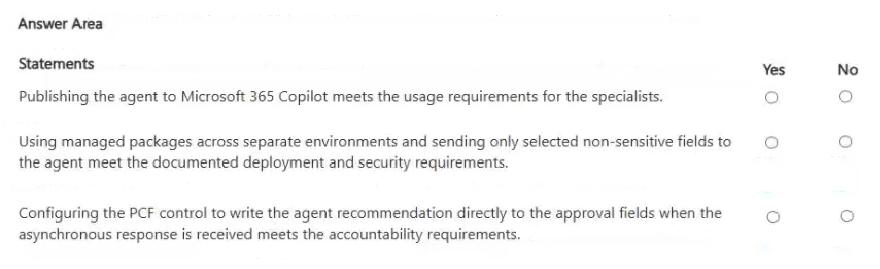
The correct selections rely on understanding that a single Copilot Studio agent can be published to multiple channels (Teams, M365 Copilot Chat) simultaneously, satisfying the 'same agent' requirement for Teams and SharePoint. The ALM requirement is met by using managed solutions promoted across environments. Crucially, the security constraint dictates that Dataverse updates must only happen after human acceptance, meaning the agent cannot autonomously write to sensitive approval fields.Why Other Candidate Answers Are Wrong
Selecting 'No' for the multi-channel capability ignores the fact that Copilot agents are channel-agnostic in their core logic; the frontend (PCF vs. Teams UI) handles the presentation, but the backend agent is shared. Assuming autonomous writing violates the explicit 'reviews and accepts' requirement and the principle of least privilege for sensitive data.Community Comment Notes
As user 007edward007 noted, the 'Teams and Microsoft 365 Copilot' channel effectively covers both Teams and SharePoint access via Copilot Chat. Another commenter highlighted that sending only non-sensitive fields aligns with data minimization principles essential for responsible AI governance.Exam Strategy
When designing AI solutions, always prioritize the 'human-in-the-loop' pattern for sensitive data operations. Remember that one agent can serve multiple front-end clients (Teams, Web, Embedded) without needing separate agent instances.
Frequently Asked Questions
Can one Copilot Studio agent be used in both Teams and SharePoint?
Yes. By publishing the agent to the 'Microsoft 365 Copilot' channel, it becomes available in Teams, Outlook, and SharePoint via Copilot Chat.
How does ALM work for Copilot Studio solutions?
You create solutions in Development, test them, and then promote the managed solution package to Test and Production environments to ensure controlled updates.