Designing Copilot Studio Agent with SharePoint Knowledge Source
Short answer
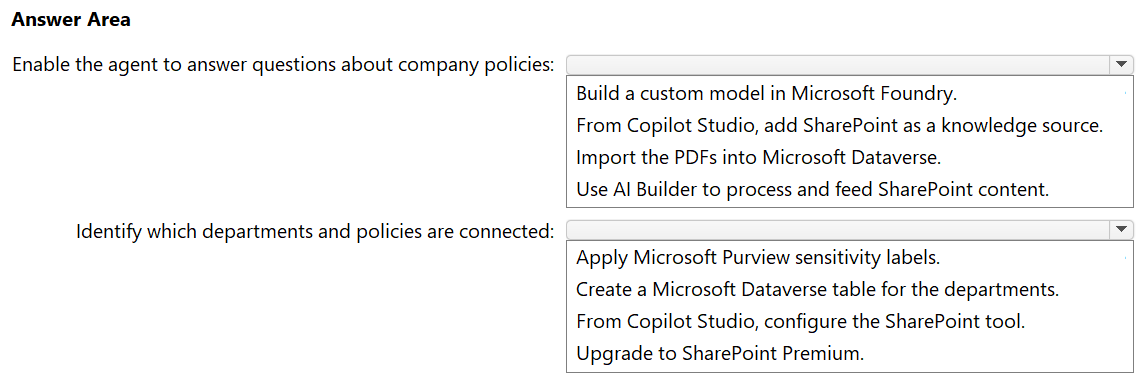
Add SharePoint as a knowledge source to enable the agent to answer questions. Leverage the existing Department column metadata in SharePoint to allow the agent to identify department-policy connections.
Question
A company has a Microsoft 365 E5 subscription and uses Microsoft Copilot Studio.
The company has a Microsoft SharePoint Online library that contains 10,000 policy PDFs from various departments. The library contains a populated column named Department for each PDF.
You need to design a Copilot Studio agent that will use the SharePoint library as a knowledge source. The solution must meet the following requirements:
Enable the agent to answer user questions about company policies.
Ensure that the agent can identify which departments and policies are connected.
What should you include in the design for each requirement? To answer, select the appropriate options in the answer area.
NOTE: Each correct selection is worth one point.
Key Takeaways
The trap is thinking you need to manually upload files or create complex Dataverse tables; the solution lies in using the native SharePoint knowledge source integration which preserves metadata.
Learn how to configure Microsoft Copilot Studio to use SharePoint Online as a knowledge source for answering policy questions and leveraging metadata for department identification.
Common mistake: Learners often mistakenly believe they must upload documents to Dataverse or create custom tools, ignoring the native capability of Copilot Studio to connect directly to SharePoint libraries and utilize their existing column metadata.
Expert Analysis
The scenario involves integrating a large SharePoint library (10,000 PDFs) into Microsoft Copilot Studio for policy Q&A. The first requirement is to enable the agent to answer questions about these policies. According to Microsoft documentation, Copilot Studio supports adding SharePoint as a knowledge source directly. This allows the agent to index and retrieve information from the documents without needing to upload them individually or use intermediate storage like Dataverse for the files themselves. Therefore, the correct action for the first requirement is to add SharePoint as a knowledge source.
The second requirement is to ensure the agent can identify which departments and policies are connected. Since the SharePoint library already has a 'Department' column populated for each PDF, this metadata is available at the source. However, simply indexing the content may not be sufficient for the agent to explicitly map and reason about departmental connections if the retrieval mechanism doesn't leverage this structured metadata effectively. While some comments suggest configuring a 'SharePoint tool,' this is not a standard configuration option in Copilot Studio for this purpose. Instead, the relationship between documents and departments is inherent in the SharePoint metadata. To make this explicit and manageable within the agent's context, especially if complex logic is needed, one might consider using Dataverse to store mappings. However, the most direct and supported method for grounding answers in SharePoint content with existing metadata is relying on the native SharePoint integration. The key insight is that the 'Department' column in SharePoint provides the necessary context for the agent to distinguish between policies. The question asks what to include in the design. For identifying connections, leveraging the existing SharePoint metadata via the knowledge source connection is the primary mechanism. Some learners incorrectly suggest uploading files to Dataverse, which is limited and unnecessary. The correct approach relies on the native SharePoint connector which respects the library structure and columns.
Official Reference
https://learn.microsoft.com/en-us/microsoft-copilot-studio/knowledge-add-sharepoint
This link opens the official vendor documentation in a new tab.
Exam Strategy
When designing AI solutions with Microsoft 365 services, always check for native integrations first. For Copilot Studio, prioritize using built-in knowledge sources like SharePoint and OneDrive over manual data ingestion methods like Dataverse uploads, unless specific structural limitations exist. Understand that metadata in source systems like SharePoint columns is automatically accessible for grounding AI responses.
Frequently Asked Questions
Can Copilot Studio index 10,000 PDFs directly from SharePoint?
Do I need to upload files to Dataverse for the agent to work?
Discussion 6 contributions
Compiled from public community threads and reader submissions, lightly edited for clarity. Handles and vote tallies are shown as recorded, and comments reflect the views of individual contributors.
From public community threads 6
-
omath 👍 91. From Copilot Studio, add SharePoint as a knowledge source. Copilot Studio can directly index a SharePoint library (including PDFs) as a knowledge source, enabling natural‑language Q&A over the content. No custom models, Dataverse imports, or AI Builder pipelines are required. 2. Create a Microsoft Dataverse table for the departments. The agent must understand relationships between departments and policies. - A Dataverse table allows you to: - Represent departments as structured entities - Link policies to departments - Enable the agent to reason over relationships (e.g., “Which policies belong to HR?”)
-
Newb007 👍 4Looks correct. Was thinking maybe upload to Dataverse but it's limited to 500 files. https://learn.microsoft.com/en-us/microsoft-copilot-studio/knowledge-add-file-upload
-
Ninashnash 👍 2There is no such thing as SharePoint tool to be configured. the only logical way I can think of is using Dataverse to hold SharePoint data mapping (document to department, somehow being synced to the actual SPO library) and be used to trim down the answers.
-
moongang 👍 1Enable the agent to answer questions about company policies: From Copilot Studio, add SharePoint as a knowledge source. Identify which departments and policies are connected: From Copilot Studio, configure the SharePoint tool. Reasoning: Adding the SharePoint library as a knowledge source is the native way to let the agent ground answers in the 10,000 PDFs using the existing Microsoft 365 E5 licensing, with no custom model, Dataverse import, or AI Builder processing needed. The knowledge source, however, indexes document content only and does not expose library column metadata like Department. The SharePoint tool (connector actions such as Get items / Get files with properties) lets the agent query the library and read the Department column for each file, so it can report which policies belong to which department. Sensitivity labels classify confidentiality rather than department, a separate Dataverse table duplicates data that already exists in the column, and SharePoint Premium is not required for any of this.
-
zsedo 👍 1"An agent can include up to 500 files as knowledge." You don't upload the files to Dataverse. You only create a table with the labels and departments.
Show 1 more comment
-
Gabrycloud 👍 1 Answered BMy initial thought is B, and after re-reading, I'm sticking with it.
Reader comments & corrections
No reader corrections yet — spotted an error or have a note? Share it below.