Configuring Malware Quarantine on Cisco Secure Email Gateway
Refer to the exhibit. A company named ABC has a Cisco Secure Email Gateway and an engineer must configure the incoming mail policy so that emails containing malware files are quarantined instead of dropped and to prevent an increase in false positives causing emails to be dropped erroneously. What must be configured on the Secure Email Gateway? - 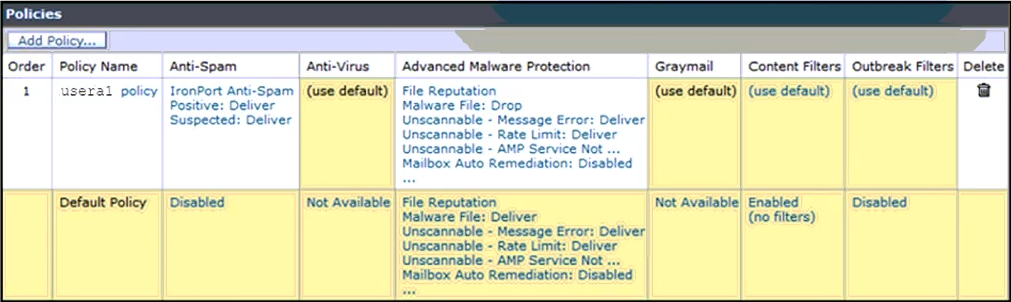
Community Votes
100% of anonymous learners picked answer B. Votes are pick records left by other test-takers — they are not the verified answer.
Community Insight
The exam tests understanding of policy precedence in SEG; the common trap is assuming the Default Policy should be modified globally rather than recognizing that a more specific existing policy takes precedence.
This question tests the configuration of incoming mail policies in Cisco Secure Email Gateway (SEG) to quarantine malware instead of dropping them. It establishes that policy order determines which rule applies first, making the specific user policy the correct override for the default behavior.
Candidates often choose 'Open Default Policy' because they want to change the global default behavior. However, modifying the default policy affects all users and doesn't utilize the specific 'usera1' policy shown in the exhibit, which is designed to handle this exact scenario.
Community Discussion (3 comments)
Comments & Corrections
No comments yet — spotted an error or have a note? Share it below.
Expert Analysis
Why the Answer Is Correct
The correct action is to modify the 'usera1' policy. In Cisco Secure Email Gateway, policies are processed in the order listed. The exhibit shows 'usera1' appearing before the 'Default Policy'. By opening the 'Messages with Malware Attachments' rule within the 'usera1' policy and changing the action from 'Drop' to 'Quarantine', you ensure that emails for usera1 containing malware are quarantined. This satisfies the requirement to prevent false positives by catching the email in quarantine for review rather than permanently dropping it.Why the Other Options Are Wrong
Changing the 'Policies Order' (Option A) might move the user policy down, potentially causing the Default Policy (which likely drops malware) to apply first. Deleting the 'usera1' policy (Option C) removes the specific override entirely, forcing all traffic through the Default Policy, which would result in dropped emails. Opening the Default Policy (Option B) changes the global setting for everyone, which is not the intended scope of a specific user policy that already exists.Community Comment Notes
Community consensus strongly supports Option D. Comments highlight that while the question text does not explicitly name 'usera1', the exhibit clearly displays a policy named 'usera1' positioned above the Default Policy. As noted by various learners, the presence of this specific policy implies it is the intended target for configuration to achieve the desired outcome without affecting other users.Exam Strategy
Always examine the exhibit for specific policy names and their order. If a specific user or group policy exists above the default, it is likely the intended place to make exceptions or overrides to satisfy specific business requirements.
Frequently Asked Questions
Why not modify the Default Policy?
Modifying the Default Policy affects all users globally. The exhibit shows a specific 'usera1' policy, indicating a need for granular control over that specific user's mail flow.
Does policy order matter in SEG?
Yes, policies are evaluated top-down. The first matching policy wins. Placing a specific policy above the Default ensures it is processed first for those users.