How to Enable Password-Only Console Authentication?
Short answer
A router(config)# line con 0
Question
Key Takeaways
The question evaluates your ability to distinguish between basic line-level password prompting (login) and database-driven authentication (login local), specifically when securing physical console access.
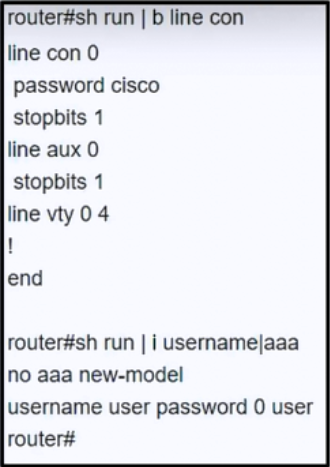
This question tests the correct IOS command to enforce password-only authentication on a router's console line. The community unanimously confirms that applying the login command under line con 0 satisfies the requirement without invoking a username database.
Common mistake: Candidates frequently choose login local or configure line vty 0 4 instead. This happens because they overcomplicate console security by assuming all authentication requires user accounts, or they confuse remote management lines with the physical console port.
Expert Analysis
Understanding Line Authentication Commands
When securing a Cisco router's console line, administrators enter global configuration mode and select the interface using line con 0. To activate password verification, the login command is applied. This directive instructs IOS to prompt users for the password previously defined with the password subcommand, fulfilling the "using only a password" requirement.
Why Other Methods Fail Here
Using login local shifts authentication away from the simple line password and forces the router to validate credentials against a locally configured username/password database or an external AAA server. Since the exhibit and question explicitly restrict the method to password-only, this option is incorrect. Similarly, selecting line vty 0 4 targets virtual terminal lines used for SSH or Telnet sessions, not the physical console port. As community members highlight, login relies solely on the line password, whereas login local demands additional account configuration, making it unsuitable for this specific scenario.
Best Practices for Console Security
Always pair the login command with a strong console password. For advanced environments, consider enabling exec-timeout to prevent idle session hijacking. Remember that console access typically bypasses AAA by default unless explicitly configured otherwise, making the login command the most direct and appropriate choice for basic password enforcement.
Exam Strategy
When an exam question specifies "password only" or "simple password," immediately look for the login command under the relevant line configuration. Reserve login local, aaa new-model, and RADIUS/TACACS+ configurations for scenarios that explicitly mention user databases, centralized authentication, or multi-factor requirements.
Community Votes
100% of anonymous learners picked answer A. Votes are pick records left by other test-takers — they are not the verified answer.
Discussion 3 contributions
Compiled from public community threads and reader submissions, lightly edited for clarity. Handles and vote tallies are shown as recorded, and comments reflect the views of individual contributors.
From public community threads 3
-
masrur 👍 11 Answered A"login" uses only a password while the "login local" command requires the configuration of a username as well as a password.
-
a197cbf 👍 2 Answered AA is correct. line con 0 already has a password, so it needs the "login" command added to the config to force you to enter a password when logging into the router console.
-
yasmiine 👍 3 Answered Aanswer A
Reader comments & corrections
No reader corrections yet — spotted an error or have a note? Share it below.
Related Analysis
Practice All 350-401 Questions
Access 218 questions with complete answers and detailed explanations.
View Full 350-401 Practice Test →