Which Layer 2 Security Mode Supports Web-Based Authentication?
Short answer
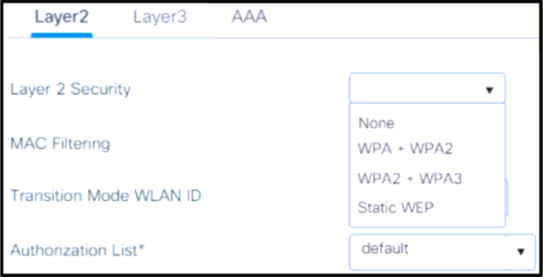
B None
Question
Key Takeaways
Candidates frequently confuse Layer 2 encryption requirements with Layer 3 captive portal flows, mistakenly selecting WPA2 because they associate wireless security with mandatory password protection.
This question tests the mandatory Layer 2 setting for deploying web-based authentication with external RADIUS servers. The community consensus confirms that 'None' must be selected, as web authentication operates at Layer 3 and requires an unencrypted initial association.
Common mistake: Option A (WPA2 + WPAS) or D (WPA+WPA2) is commonly chosen due to the assumption that all enterprise SSIDs must enforce encryption. However, enabling these modes blocks the initial DHCP and HTTP redirect process required for the web login splash page, rendering web authentication impossible.
Expert Analysis
Core Concept: Layer 2 vs. Layer 3 Authentication
In Cisco wireless architecture, security is strictly segmented into Layer 2 (association and encryption) and Layer 3 (user/group authentication and authorization). Web-based authentication, also referred to as Captive Portal or Central Web Authentication (CWA), is fundamentally a Layer 3 mechanism. Because clients must obtain an IP address via DHCP and reach a transparent HTTP proxy for the splash page redirect before any credentials are entered, the radio interface cannot enforce Layer 2 encryption or pre-authentication checks.
Why "None" is Correct
The Layer 2 security mode must be configured to None. This creates an open association state, allowing the client to complete DHCP, receive an IP, and trigger the captive portal redirect. Once authenticated via the external RADIUS server, the WLC can apply post-authentication policies such as dynamic VLAN assignments or optional data encryption through group policies. Community contributors consistently highlight that Cisco’s official configuration guides explicitly mandate setting the L2 tab to "None" when enabling web authentication features.
Why Other Options Fail
Options A and D enforce CCMP/AES encryption and require either Pre-Shared Keys or 802.1X/EAP exchanges. These methods demand successful cryptographic handshakes before granting Layer 3 access, which directly contradicts the "connect first, authenticate later" workflow of web portals. Option C (Static WEP) is obsolete, cryptographically broken, and functionally incompatible with modern web redirect architectures. Selecting any encryption mode will drop the initial unauthenticated traffic destined for the authentication server.
Official Reference
This link opens the official vendor documentation in a new tab.
Exam Strategy
When troubleshooting or designing WLAN security on certification exams, always map the authentication feature to its corresponding OSI layer. If a solution relies on HTTP redirects, splash pages, or DHCP discovery (like Web Auth, BYOD, or NAC), assume Layer 2 security must be set to "None" unless the scenario explicitly describes post-authentication encryption. Memorize the L2/L3 compatibility matrix to quickly eliminate trap answers that incorrectly pair modern encryption with web-based access controls.
Community Votes
100% of anonymous learners picked answer B. Votes are pick records left by other test-takers — they are not the verified answer.
Discussion 10 contributions
Compiled from public community threads and reader submissions, lightly edited for clarity. Handles and vote tallies are shown as recorded, and comments reflect the views of individual contributors.
From public community threads 10
-
EAC84 👍 5 Answered Bhttps://www.cisco.com/c/en/us/support/docs/wireless/catalyst-9800-series-wireless-controllers/213920-central-web-authentication-cwa-on-cata.html#toc-hId-2024006454 ^^^ WLAN Configuration Step 3 ^^^
-
shefo1 👍 4maybe "B" is right because || from OCG p.572 (Open Authentication will be used because the None method has been selected) based on all description that mention AAA , does not require encryption or special security at Layer 2. Instead, it relies on a web page to authenticate users and typically uses RADIUS servers for the actual authentication process. So, for this setup, no Layer 2 security is necessary.
-
Shri_Fcb10 👍 4 Answered BNone: When using web-based authentication and external RADIUS servers, the Layer 2 security mode should be set to "None" or "Open." This allows clients to associate with the SSID without any Layer 2 encryption or authentication, as authentication and encryption are handled at Layer 3 (web-based authentication) and by the RADIUS server, respectively.
-
AbdullahMohammad251 👍 2 Answered BCompatibility between L2 and L3 security methods: Static WEP (L2 security) + web authentication (L3 security) = valid WPA + WPA2 + web authentication = invalid none + web authentication = valid 802.1x + web authentication = invalid To configure the WLC for web authentication: "Click the Layer 2 tab and set the security to None" https://www.cisco.com/c/en/us/support/docs/wireless-mobility/wlan-security/71881-ext-web-auth-wlc.html#:~:text=Click%20the%20Layer%202%20tab%20and%20set%20the%20security%20to%C2%A0None https://www.cisco.com/c/en/us/support/docs/wireless/4400-series-wireless-lan-controllers/106082-wlc-compatibility-matrix.html#:~:text=are%20more%20secure).-,Wireless%20LAN%20Controller%20Layer%202%20%E2%80%93%20Layer%203%20Security%20Compatibility%20Matrix,-When%20you%20configure
-
Megon 👍 2webauth and Raduis are L3 security while L2 is for encryption so since the question is asking for web AND Raduis then WPA2 should be enabled
Show 5 more comments
-
masrur 👍 2Answer is D: The splash page redirect feature is available only for WLANs that are configured for 802.1x or WPA+WPA2 Layer 2 security.
-
RickAO76 👍 1 Answered AWPA2 (Wi-Fi Protected Access 2) provides strong security for wireless networks. WPAS (Wi-Fi Protected Access with Pre-Shared Key) is a variation of WPA that uses pre-shared keys for authentication
-
[Removed] 👍 1 Answered BB is correct the SSID will be open and have no password, when you try to connect to the SSID you will be directed to a WEB interface where you do the authentication on it based on many options
-
IgorLVG 👍 1 Answered Cthe answer is "B. NONE" ref: https://www.cisco.com/c/en/us/support/docs/wireless/catalyst-9800-series-wireless-controllers/213920-central-web-authentication-cwa-on-cata.html
-
Adalberto 👍 1 Answered AA is the Answear.
Reader comments & corrections
No reader corrections yet — spotted an error or have a note? Share it below.
Related Analysis
Practice All 350-401 Questions
Access 218 questions with complete answers and detailed explanations.
View Full 350-401 Practice Test →