How to Automatically Enable Privileged EXEC Mode via SSH?
Short answer
D Configure user "cisco" with privilege level 15.
Question
Key Takeaways
It tests the distinction between line-level defaults and user-specific authorization, highlighting that login local requires privilege assignment at the user definition level, not the VTY line level.
This question tests how Cisco IOS assigns privilege levels during remote SSH access. The community consensus supports configuring the privilege level directly on the local username database when login local is enabled.
Common mistake: Candidates often choose option C (line vty privilege level 15) assuming it globally overrides all sessions, failing to account for the login local directive which prioritizes the local username database settings.
Expert Analysis
Understanding the Configuration Context
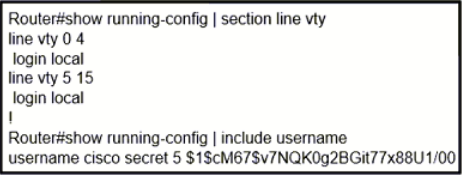
Based on the exhibit (which typically shows line vty 0 4 followed by login local and a username cisco entry), the question focuses on how Cisco IOS handles authorization when local authentication is enforced. The login local command redirects VTY sessions to validate credentials against the router's local username database rather than prompting for a simple line password.
Why Option D is Correct
By default, all authenticated users enter User EXEC mode (Privilege Level 1). To bypass the manual enable command and land directly in Privileged EXEC mode (Level 15), you must explicitly assign that level to the user account. The command username cisco privilege 15 secret <password> achieves this. Because login local is active, the device checks the local database for both authentication and authorization, making the user-specific privilege setting the authoritative source for session initialization. As noted by community members testing in EVE-NG, this configuration reliably grants immediate privileged access.
Why Option C is a Common Trap
Many candidates select Option C (line vty 0 4 → privilege level 15) assuming it acts as a global override for all remote sessions. While line vty privilege level does change the default for unauthenticated or non-local-authenticated sessions, it does not override user-specific authorization when login local is configured. In Cisco IOS, user-level privilege assignments take precedence over line-level defaults for authenticated sessions. Therefore, C would only work if the line used simple password authentication (login without local), which contradicts the exhibit's implied configuration.
Eliminating Other Options
- Option A only sets a line password; it does not influence privilege levels or trigger automatic elevation.
- Option B suggests matching secrets, which is a severe security anti-pattern and has no functional impact on privilege escalation mechanics.
This aligns with the Cisco Learning Network consensus that local database entries dictate session privileges when login local is applied.
Official Reference
- https://www.cisco.com/c/en/us/td/docs/switches/lan/catalyst2960l/software/15-2_5_e/config-guide/b_1525e_consolidated_2960l_cg/b_1525e_consolidated_2960l_cg_chapter_0100001.pdf
- https://learningnetwork.cisco.com/s/question/0D53i00000KstA2CAJ/privilege-level-when-username-command-is-configured
These links open the official vendor documentation in a new tab.
Exam Strategy
When troubleshooting or designing remote access policies, always check the authentication method first. If login local or AAA is specified, prioritize user-database or server-side authorization settings over line-level configurations. Exams frequently test this hierarchy to ensure you understand that user-specific commands override line defaults.
Community Votes
56% of anonymous learners picked answer D. Votes are pick records left by other test-takers — they are not the verified answer.
Discussion 16 contributions
Compiled from public community threads and reader submissions, lightly edited for clarity. Handles and vote tallies are shown as recorded, and comments reflect the views of individual contributors.
From public community threads 16
-
slacker_at_work 👍 7MaxF1(config)# line vty 0 4 MaxF1(config-line)# login local MaxF1(config-line)# privilege level 15 With this configuration, the device prompts for a username and password when accessing the vty lines, and upon successful authentication, the user is placed into privilege exec mode automatically.
-
a197cbf 👍 4 Answered CI'm going with C. The question asks "Which action automatically enables privilege exec mode when logging in via SSH?". This sounds like they're asking REGARDLESS of the account you use to log in, not just limited to the user "cisco". C seems more accurate in this regard. If they were asking specifically how to give the user "cisco" privileged access when logging in via SSH, then D would be more accurate.
-
Mekai2020 👍 4 Answered Dhttps://learningnetwork.cisco.com/s/question/0D53i00000KstA2CAJ/privilege-level-when-username-command-is-configured
-
Jasper 👍 3 Answered DBecause of the Cisco username is shown in the output as the only user, but C is the right option all users that aren't there.
-
gorillaenhanced 👍 3 Answered CD applies to user cisco only C applies to all users C and D are correct but C is better IMO
Show 11 more comments
-
Mekai2020 👍 3 Answered Dhttps://learningnetwork.cisco.com/s/blogs/a0D3i000002eeWTEAY/cisco-ios-privilege-levels
-
yasmiine 👍 3 Answered DAnswer D seems correct. #username cisco privilege 15 secret 5 yyyyy
-
AbdullahMohammad251 👍 2 Answered DOption "c" works if password checking is enabled --using the 'login' command. The following configuration prompts the user to enter a password and automatically grants privilege EXEC mode when connecting via SSH: -------- Router(config)# line vty 0 15 Router(config-line)# password 123 Router(config-line)# login Router(config-line)# privilege level 15 ------- Since we're using both a username and a password for login --using the 'login local' command, it is essential to set the user privilege level to 15 (the highest privilege) as follows: ---------- Router(config)# username cisco privilege 15 secret 5 $1$cM67$v7NQK0g2BGit77x88U1/00 ---------- With this configuration, any user logging in with the username "cisco" and the corresponding password will be placed directly into privilege EXEC mode upon authentication.
-
IgorLVG 👍 2 Answered Cref: https://www.cisco.com/c/en/us/td/docs/switches/lan/catalyst2960l/software/15-2_5_e/config-guide/b_1525e_consolidated_2960l_cg/b_1525e_consolidated_2960l_cg_chapter_0100001.pdf line vty line Example: Switch(config)# line vty 10 Switch(config)# privilege level 15 Changes the default privilege level for the line. for normal user EXEC mode privileges. Level the level of access permitted by the enable password.
-
apetrov 👍 2 Answered CThe privilege command on the vty lines override all the privilege levels sent via RADIUS or set in the local database. And because the question implies "automatically" the clear answer is C
-
zbeugene7 👍 1 Answered Dlogin local means the local username definition is used therefore privilege level should be added to the user definition not to the line
-
slacker_at_work 👍 1 Answered CSo the answer is C, it is not stated that only user cisco needs to gain privillige access
-
christiannomarcenes 👍 1 Answered DOption D Tested on EVE-NG OK. Option C doesn't login in "privilege mode'.
-
night_wolf_in 👍 1 Answered CIt didnt specify which user, so any user will be option C.
-
gorillaenhanced 👍 1Why C is wrong ?
-
Rfvaz 👍 1 Answered CC makes sense
Reader comments & corrections
No reader corrections yet — spotted an error or have a note? Share it below.
Related Analysis
Practice All 350-401 Questions
Access 218 questions with complete answers and detailed explanations.
View Full 350-401 Practice Test →