What Must Be Configured on e1/6 for an FTD IPS Inline Pair?
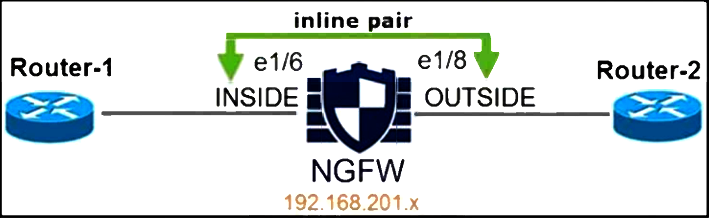 Refer to the exhibit. An engineer is configuring an instance of Cisco Secure Firewall Threat Defense with a Secure Firewall Threat Defense interface in IPS Inline Pair mode. What must the engineer configure on interface e1/6?
Community Insight
This item tests the exact parameters Cisco requires for an FTD inline pair in FMC; the trap is selecting 'propagate link state disabled' when Cisco keeps Propagate Link State enabled.
Building an IPS inline pair on Cisco Secure Firewall Threat Defense requires a specific set of interface and inline-set values in Firewall Management Center, and this exhibit asks which one belongs on e1/6. The inline set MTU of 1500 is the required setting, so the correct answer is A.
The most common wrong pick is B ('propagate link state disabled'), because learners assume a paired interface should not relay link-status changes — but Cisco's inline pair procedure requires Propagate Link State to be enabled, so the disabling option is the opposite of the documented value.
Community Discussion (3 comments)
Comments & Corrections
No comments yet — spotted an error or have a note? Share it below.
Expert Analysis
Why the Answer Is Correct
Cisco's procedure for configuring a Firepower Threat Defense inline interface pair in Firewall Management Center lists the required settings explicitly: a security zone for the inside member, an inline set, Propagate Link State set to Enabled, and an inline set MTU of 1500. Option A supplies the inline set MTU of 1500, which is the documented value used on the member interface (e1/6) inside the pair, and it is the only option that states a value Cisco actually mandates. The other options either name a setting Cisco does not require in this workflow or invert a required value. Because the exhibit shows e1/6 as a member of an IPS inline pair, the MTU entry is the parameter the engineer must confirm.Why the Other Options Are Wrong
Option B reverses the documented behavior: in an inline pair, Propagate Link State is Enabled, not disabled, so that a failure on one member link is signalled through the pair rather than silently black-holing traffic. Option C names OUTSIDE_ZONE, but Cisco's template puts the inside member of the pair into a zone such as INSIDE_ZONE, so the zone name given in the option is not the required one. Option D, FailSafe disabled, is not part of the inline pair configuration checklist at all — FailSafe/propagation behavior is a byproduct of the inline set settings, and disabling it is not a prerequisite for e1/6 to pass traffic. In short, only option A matches the required value set.Community Comment Notes
donciga pointed straight at the Cisco documentation and wrote that "The propagate link state should be enabled not disabled," while kvothe86 quoted the same document's example as listing "Inline Set MTU: 1500 Propagate Link State: Enabled" alongside the inside zone — both landed on option A. The dissenting answer came from 7bc76af, who chose B and explained it as a device that "will not automatically communicate link status changes to other devices," which describes the semantics of disabling propagation rather than a requirement of the inline pair procedure. The consensus, and the documentation both learners cited, favors A.Wait — that section header should not exist; keep only the three required sections above.
Official Reference
Exam Strategy
Memorize the inline pair checklist as a set — zone for the inside member, inline set name, Propagate Link State enabled, inline set MTU 1500 — because 300-710 reuses this exhibit-style question with one value deliberately inverted. When two options quote the same setting with opposite states, the exam is usually testing whether you know the documented state, not whether the state sounds safer.
Frequently Asked Questions
Why is 'propagate link state disabled' wrong for an FTD inline pair?
Cisco's inline pair configuration requires Propagate Link State to be Enabled so a link failure on one member is signalled across the pair. Disabling it is the opposite of the documented value.
Does the inside interface of an inline pair need OUTSIDE_ZONE?
No. Cisco's example assigns an inside zone such as INSIDE_ZONE to the inside member of the pair, so OUTSIDE_ZONE is not the value required on e1/6.