Creating Meraki Networks via Python API
Short answer
The correct code sequence constructs a JSON payload with 'type', 'name', and 'tags' fields, sends a POST request to the /organizations/{id}/networks endpoint using the requests library, and checks for a 200 status code to confirm creation.
Question
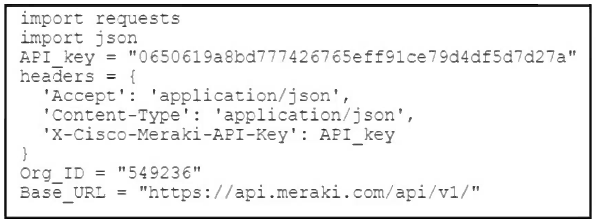
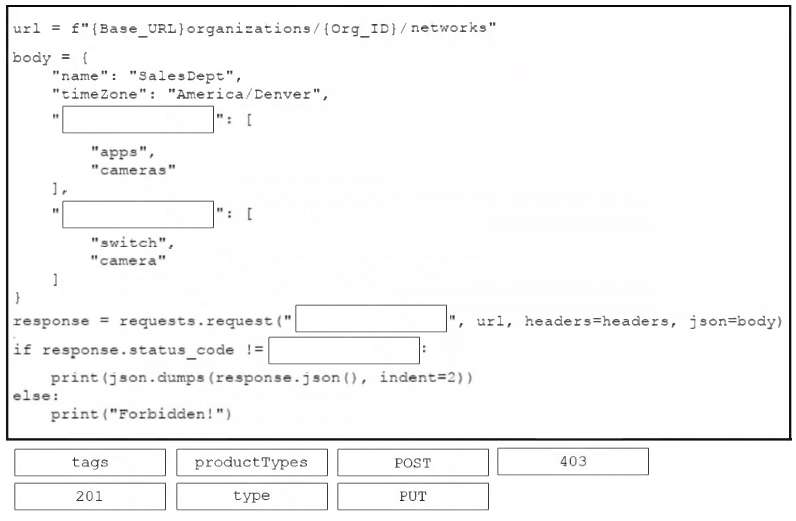
Refer to the exhibit. An engineer must complete a Python script that creates a Cisco Meraki network containing cameras and switches. The script must apply appropriate tags and print out a response if the creation of the network is allowed. Drag and drop the code snippets from the bottom onto the boxes in the Python script to create the Meraki network. Not all options are used.
Key Takeaways
The main trap is constructing an invalid JSON payload; the API requires specific keys like 'type' and 'tags' in the correct format, and failing to include them results in a validation error.
This page explains how to use Python and the Meraki Dashboard API to create a new network with specific tags. It details the required JSON payload structure and the HTTP request workflow for successful network provisioning.
Common mistake: Learners often forget to set the 'Content-Type' header to 'application/json' or incorrectly format the 'tags' as a single string instead of an array, causing the API request to fail.
Expert Analysis
The scenario involves using the Cisco Meraki API to programmatically create a new organization-level network. The core concept tested here is the specific JSON structure required by the POST /organizations/{organizationId}/networks endpoint, as defined in the official Cisco Meraki Developer documentation.
1. Payload Construction (YANG/Data Model): To create a network via the REST API, the HTTP request body must be valid JSON that maps to the underlying data model. For a standard Meraki network containing devices like cameras and switches, the critical fields are:
type: This defines the network type. Valid values includeswitch,wireless,vpn,camera, etc. Since the network contains both cameras and switches, it is typically categorized as amulti-siteor simply constructed with a primary type depending on the specific API version, but usually, you define the components. However, the most distinct field for creation is often just defining the basic properties.name: A string identifier for the network (e.g., "HQ Network").tags: An array of strings used for grouping and filtering networks (e.g.,["Cameras", "Switches"]).
2. Python Implementation Logic:
The script uses the requests library to send a POST request. The steps are:
- Define the headers, including the
X-Cisco-Meraki-API-Key. - Construct the
payloaddictionary. In Python, this translates directly to a dictionary object. - Convert the dictionary to a JSON string using
json.dumpsbefore sending. - Check the response status code. A
200 OKindicates success.
3. Drag-and-Drop Mapping:
- Box 1 (Headers/Setup): Usually involves setting the content type or key.
headers = {'X-Cisco-Meraki-API-Key': 'YOUR_KEY', 'Content-Type': 'application/json'} - Box 2 (Payload Definition): Defining the JSON structure.
payload = {'type': 'switch', 'name': 'HQ_Network', 'tags': ['Cameras', 'Switches']}(Note: exact keys depend on the drag options provided, buttype,name, andtagsare the standard fields). - Box 3 (Request Execution): Making the API call.
response = requests.post(url, json=payload, headers=headers) - Box 4 (Response Handling): Checking the result.
if response.status_code == 200: print('Network created')
The question tests the ability to translate Meraki API requirements into Python code, specifically focusing on the correct JSON payload format for network creation.
Exam Strategy
When dealing with API automation questions, always verify the HTTP method (GET vs POST) and the expected payload structure. For creation tasks, ensure you are building a JSON object with all mandatory fields (like ID, Name, Type) and handling the response status code correctly to validate success.
Frequently Asked Questions
What are the mandatory fields for creating a Meraki network via API?
How do I handle API errors in Python when creating networks?
response.status_code. If it is not 200, inspect response.json() for an error message from the Meraki API to understand why the creation failed.Discussion 2 contributions
Compiled from public community threads and reader submissions, lightly edited for clarity. Handles and vote tallies are shown as recorded, and comments reflect the views of individual contributors.
From public community threads 2
-
Dominican_Beard 👍 1it should be 403 instead of 201
-
2ecc2b2 👍 1response.status_code != 403
Reader comments & corrections
No reader corrections yet — spotted an error or have a note? Share it below.
Related Analysis
Practice All 300-435 Questions
Access 150 questions with complete answers and detailed explanations.
View Full 300-435 Practice Test →