Completing Webhook Receiver Code Snippet with Flask Request Handling
Short answer
C Use request.get_json() to parse the incoming JSON webhook payload into a Python dictionary for processing.
Question
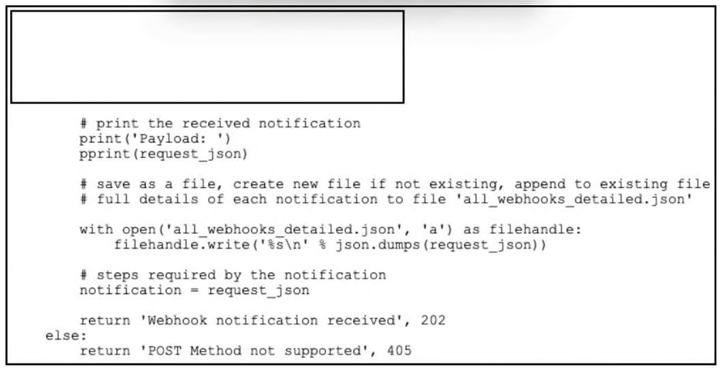
Refer to the exhibit. Which code snippet must be added to the box in the code to complete the webhook receiver function?
Key Takeaways
Webhooks send JSON payloads; you must use get_json() to convert the raw HTTP request into a usable Python dictionary.
Learn how to correctly parse incoming JSON webhooks in Python using Flask's request.get_json() method for Cisco automation solutions.
Common mistake: Using request.form (Option D) is incorrect because it only works for URL-encoded forms, not JSON bodies, leading to empty data extraction.
Expert Analysis
The question asks for the code snippet to complete a webhook receiver function, which implies handling an incoming HTTP POST request from a controller or monitoring system. In Python web frameworks like Flask (commonly used in Cisco automation contexts), receiving data requires accessing the request payload.
Option C is the correct answer. It uses request.get_json to parse the incoming JSON payload into a Python dictionary. This is the standard and most robust way to handle JSON data sent via a webhook in Flask. The variable data is then assigned this parsed object, allowing subsequent logic to inspect event types or metrics.
Option A attempts to use request.json, which is a property that returns None if parsing fails or if the content type is not application/json, making it less reliable than .get_json. Furthermore, simply assigning request.json without error handling can lead to NoneType errors later.
Option B uses request.data, which retrieves the raw bytes of the request body. While valid, it requires manual decoding and JSON parsing, which is unnecessary overhead when get_json handles it automatically.
Option D tries to access request.form, which is intended for URL-encoded form data (application/x-www-form-urlencoded) or multipart/form-data, not JSON payloads typically sent by modern network controllers via RESTful webhooks. Using form on a JSON request would result in an empty dict, causing the webhook handler to fail.
Exam Strategy
When dealing with webhook receivers in Python exams, always identify the expected content type. For JSON webhooks, prefer request.get_json() over request.json or request.data due to its explicit error handling and reliability. Avoid request.form unless specifically dealing with HTML form submissions.
Frequently Asked Questions
Why not use request.json instead of get_json?
request.json is a property that may return None if parsing fails silently or if headers are missing. get_json() is a method that provides more control and is generally preferred for robustness.Can I use request.data for webhooks?
json.loads(). It is less efficient than get_json() which does this automatically.Community Votes
100% of anonymous learners picked answer B. Votes are pick records left by other test-takers — they are not the verified answer.
Discussion 1 contributions
Compiled from public community threads and reader submissions, lightly edited for clarity. Handles and vote tallies are shown as recorded, and comments reflect the views of individual contributors.
From public community threads 1
-
Dominican_Beard 👍 1 Answered BB is correct.
Reader comments & corrections
No reader corrections yet — spotted an error or have a note? Share it below.
Related Analysis
Practice All 300-435 Questions
Access 150 questions with complete answers and detailed explanations.
View Full 300-435 Practice Test →