Troubleshooting BGP TCP MD5 Authentication Errors
Short answer
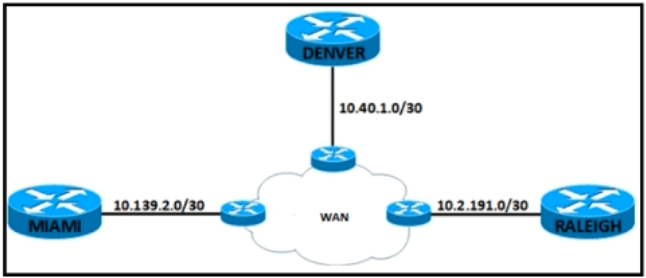
D Configure BGP authentication on the router with IP address 10.40.1.1.
Question
Key Takeaways
The log message explicitly mentions TCP port 179 and MD5 digests, which are specific to BGP authentication; the common trap is confusing this with OSPF or NTP protocols.
This question addresses the %TCP-6-BADAUTH error indicating missing BGP MD5 authentication on a neighbor, establishing that both peers must have matching authentication configurations to establish a session.
Common mistake: Candidates often select A (OSPF) because OSPF also supports authentication, but they fail to notice the 'TCP' keyword in the log, which rules out OSPF as it uses IP protocol 89.
Expert Analysis
Why the Answer Is Correct
The error message "%TCP-6-BADAUTH: No MD5 digest from 10.40.1.1... to 10.40.1.2(179)" contains two critical clues: the protocol is TCP (specifically port 179) and the issue is a missing MD5 digest. BGP is the only routing protocol among the options that operates over TCP port 179 and uses MD5 authentication (TCP-AO is newer, but MD5 is the classic method referenced here). Since the DENVER router (10.40.1.2) is receiving a packet without a digest from 10.40.1.1, it indicates that 10.40.1.1 lacks the configured password. Therefore, configuring BGP authentication on 10.40.1.1 resolves the mismatch.
Why the Other Options Are Wrong
Option A is incorrect because OSPF does not use TCP; it uses IP protocol 89 directly. Option B is incorrect because NTP uses UDP port 123. Option C is incorrect because the error originates FROM 10.40.1.1, meaning the missing configuration is on that peer, not on the local router 10.40.1.2. Configuring the local router alone will not fix the fact that the incoming packets from 10.40.1.1 are unauthenticated.
Community Comment Notes
Community members consistently identified D as correct by focusing on the "TCP" keyword to rule out OSPF and NTP. As one user noted, "I go with D because it says 'TCP'. OSPF doesn't use TCP, and NTP uses UDP." Another comment clarified the directionality: "This log message is displayed for return traffic from a router that does not have MD5 authentication configured for BGP," confirming that the remote peer needs the fix.
Exam Strategy
When troubleshooting routing issues, always check the transport layer in log messages. If you see 'TCP', think BGP. If you see 'IP protocol 89', think OSPF. If you see 'UDP', think NTP or SNMP. This quick identification saves time and prevents selecting wrong protocol-based options.
Frequently Asked Questions
Why can't we just configure authentication on the Denver router (10.40.1.2)?
Does OSPF ever use TCP for authentication?
Community Votes
100% of anonymous learners picked answer D. Votes are pick records left by other test-takers — they are not the verified answer.
Discussion 5 contributions
Compiled from public community threads and reader submissions, lightly edited for clarity. Handles and vote tallies are shown as recorded, and comments reflect the views of individual contributors.
From public community threads 5
-
[Removed] 👍 2 Answered DD is corerct but it must be done on both routers, however since we have only one option to choose D is correct anyway https://community.cisco.com/t5/switching/tcp-6-badauth-no-md5-digest/td-p/1627116
-
kldoyle97 👍 1 Answered DThis log message is displayed for return traffic from a router that does not have MD5 authentication configured for BGP If a router has a password configured for a neighbor, but the neighbor router does not, a message such as this is displayed while the routers attempt to establish a BGP session between them: %TCP-6-BADAUTH: No MD5 digest from [peer's IP address]:11003 to [local router's IP address]:179 10.40.1.2 is Denver's address Must configure MD5 authentication on the WAN router 10.40.1.1 https://www.cisco.com/c/en/us/support/docs/ip/border-gateway-protocol-bgp/112188-configure-md5-bgp-00.html#:~:text=This%20document%20describes%20how%20to%20configure%20Message%20Digest5
-
0d2257b 👍 1 Answered DI go with D because it says "TCP". OSPF doesn't use TCP, and NTP uses UDP. BGP is the only one that uses TCP here.
-
jabal93 👍 1 Answered Dgiven answer is correct, Denver router messing the authentication config as shown in the error message.
-
Br2 👍 1 Answered Danswer is d
Reader comments & corrections
No reader corrections yet — spotted an error or have a note? Share it below.
Related Analysis
Practice All 300-410 Questions
Access 159 questions with complete answers and detailed explanations.
View Full 300-410 Practice Test →