Domain Join Failure Due to Manual DNS Configuration
Short answer
D Manually setting DNS servers to external resolvers prevents the client from resolving internal Active Directory Domain Controller names required for domain joining.
Question
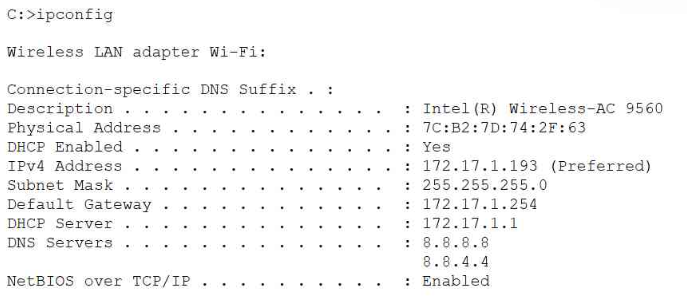
Which of the following is the most likely cause?
Key Takeaways
The main trap is confusing general network connectivity with Active Directory-specific name resolution requirements, where internal DNS SRV records are mandatory.
This CompTIA A+ question addresses why a computer fails to join a domain when ipconfig shows manually assigned DNS servers instead of dynamically obtained internal ones.
Common mistake: Many candidates choose 'Subnet mask is incorrect' because they see a manual configuration and assume a typo. However, a wrong subnet mask typically breaks all connectivity, whereas incorrect DNS specifically breaks domain services while allowing general internet access.
Expert Analysis
The scenario describes a domain join failure accompanied by an ipconfig output showing manual DNS settings (typically public resolvers like 8.8.8.8 or similar, as implied by the context of such exam questions). Joining a computer to an Active Directory domain requires name resolution for Domain Controllers. This relies on internal DNS servers that host the necessary SRV records. Public DNS servers do not have these records, causing the join to fail.
The key distinction here is between dynamic and static IP configuration in a corporate environment. While manually setting a subnet mask (Option A) would cause general connectivity issues, it wouldn't specifically prevent name resolution if the correct internal DNS were also set. NetBIOS (Option B) being enabled is generally harmless or even helpful for legacy support, not a blocker. DHCP (Option C) being enabled is standard practice and does not inherently cause failures; in fact, it usually helps by automatically providing the correct DNS. The specific trap is assuming that any manual setting is wrong, but the critical error is the DNS server selection. By manually setting DNS to non-internal servers, the client cannot locate the Domain Controller.
Comments correctly identify that the DNS servers are likely set to external/public IPs (e.g., Google's 8.8.8.8), which lack the internal AD infrastructure records. Therefore, the root cause is the manual assignment of incorrect DNS servers.
Exam Strategy
When troubleshooting domain join issues, always check the DNS configuration first using ipconfig /all. If DNS points to public resolvers (like 8.8.8.8), switch to automatic (DHCP) or point to internal DNS servers. Remember that Active Directory relies heavily on DNS SRV records which only exist on internal authoritative servers.
Frequently Asked Questions
Why can't I use public DNS like 8.8.8.8 for domain joins?
Does enabling DHCP guarantee a successful domain join?
Community Votes
100% of anonymous learners picked answer D. Votes are pick records left by other test-takers — they are not the verified answer.
Discussion 3 contributions
Compiled from public community threads and reader submissions, lightly edited for clarity. Handles and vote tallies are shown as recorded, and comments reflect the views of individual contributors.
From public community threads 3
-
4070187 👍 1 Answered DJoining a computer to a domain refers to Active Directory. The client computer needs to be able to resolve the name of the Active Directory Domain Controller. DNS Servers should be dynamically assigned so the Active Directory enabled DNS Servers will be contacted.
-
Afie 👍 1 Answered DThe DNS servers are set to Google DNS (8.8.8.8 and 8.8.4.4) instead of the company's internal DNS server
-
Macwell2 👍 1 Answered DDNS servers are manually set is correct
Reader comments & corrections
No reader corrections yet — spotted an error or have a note? Share it below.
Related Analysis
Practice All 220-1201 Questions
Access 105 questions with complete answers and detailed explanations.
View Full 220-1201 Practice Test →