Meraki Dashboard Access Uses TCP Port 443
Short answer
C The Cisco Meraki dashboard is reached over HTTPS on TCP port 443 to complete the network configuration.
Question
Key Takeaways
Meraki management is cloud-based, so dashboard access is a standard secure web session on 443 — not a device-login protocol such as SSH on 22 or Telnet on 23.
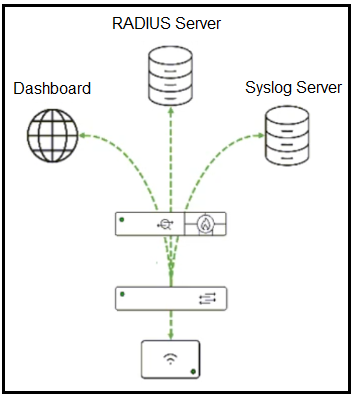
The Cisco Meraki dashboard is a cloud management portal reached from a browser over HTTPS, which uses TCP port 443. Meraki devices also maintain their cloud connection on 443, so 443 is the port that gains access to the dashboard to complete configuration.
Common mistake: Picking 8080 because it is a common alternative HTTP port; the Meraki dashboard is served over standard HTTPS on 443, and 8080 is not used for dashboard access.
Expert Analysis
Why the Answer Is Correct
The Meraki dashboard is a cloud-hosted web portal that administrators open in a browser, and secure web portals are published over HTTPS, which by convention listens on TCP port 443. Meraki devices also establish their management connection to the cloud on 443, so the same port both serves the dashboard and carries device telemetry, making 443 the port used to reach the dashboard and configure the network.
Why the Other Options Are Wrong
Port 22 is SSH, used for encrypted command-line access to a device, not for opening a browser-based management dashboard. Port 23 is Telnet, an insecure legacy remote-login protocol on which no cloud dashboard is served. Port 8080 is an alternate HTTP port occasionally used by local admin pages or proxies, but the Meraki dashboard uses standard HTTPS and is not reached on 8080.
Community Comment Notes
Commenters were unanimous that the dashboard is a cloud platform accessible from a browser over HTTPS on TCP 443 and that Meraki devices likewise use 443 for their secure cloud communication. The most detailed comment stressed that HTTPS on 443 is the single port for both dashboard access and device-to-cloud management.
Official Reference
https://developer.cisco.com/meraki/api-v1/
This link opens the official vendor documentation in a new tab.
Exam Strategy
Associate 'Meraki dashboard' with cloud-hosted HTTPS management on port 443. When a question asks which port provides browser access to a cloud management portal, choose 443 and reject SSH 22, Telnet 23 and the alternate HTTP port 8080.
Frequently Asked Questions
Which TCP port is used to access the Meraki dashboard?
Why is port 8080 not the answer for Meraki dashboard access?
Community Votes
100% of anonymous learners picked answer C. Votes are pick records left by other test-takers — they are not the verified answer.
Discussion 2 contributions
Compiled from public community threads and reader submissions, lightly edited for clarity. Handles and vote tallies are shown as recorded, and comments reflect the views of individual contributors.
From public community threads 2
-
daniii89 👍 1 Answered CCisco Meraki Dashboard is a cloud-based network management platform that allows administrators to configure, monitor, and manage Meraki devices (APs, switches, firewalls, etc.). The Meraki Dashboard is accessed via a web browser over HTTPS (TCP Port 443). All Meraki devices establish secure cloud communication with the dashboard using TCP 443.
-
xsuper 👍 1 Answered CC is correct
Reader comments & corrections
No reader corrections yet — spotted an error or have a note? Share it below.
Related Analysis
Practice All 200-901 Questions
Access 105 questions with complete answers and detailed explanations.
View Full 200-901 Practice Test →